Building a Cisco Secure AI Factory
Estimated time to read: 43 minutes
- Originally Written: October, 2026
Overview
For the last 12 months I've been working with colleagues to build an internal lab that can be used by our data center teams for customer demos, proof of concepts, training, and testing of new product features.
As you can imagine, much of the focus has been on AI/ML and GPU workloads so I'm documenting some of the design and setup of the "Secure AI Factory" components for future reference.
A few notes about the setup and this post
We built the lab to our requirements and in some cases, due to infrastructure availablilty and the knowledge that it's a lab not a production environment, we consolidated components or modified them to meet our needs. It's always best to follow the release notes, install guides, and validated designs if this is for a production environment.
This post isn't designed to be a comprehensive install guide but a high-level overview of some of the components we use and the reasoning behind the choices we made.
We had help from LLMs such as ChatGPT/Claude for the component installs (e.g. NIM, GPU Operator), to generate the Openshift resource YAMLs, and troubleshoot when things weren't working.
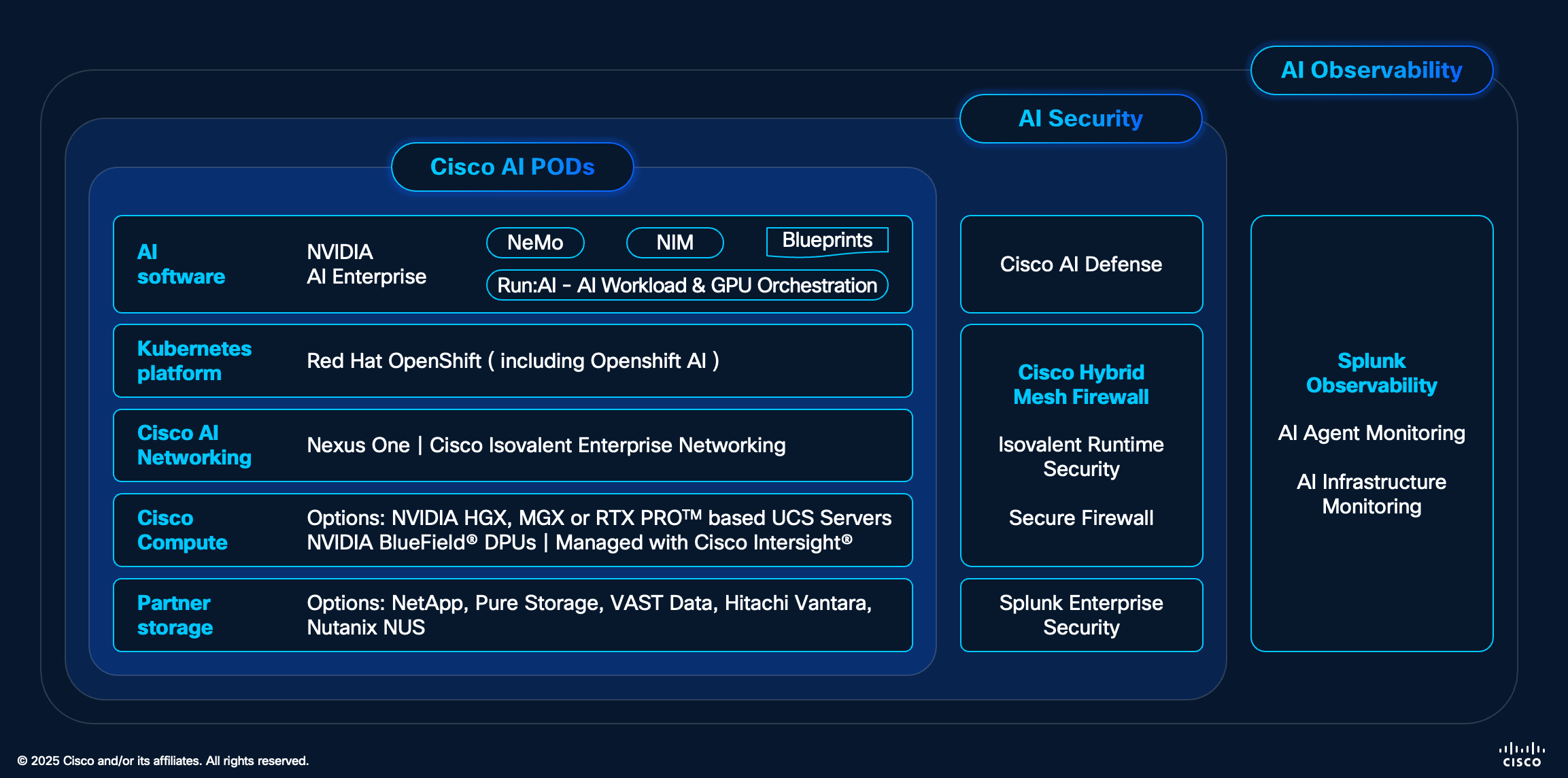
This is the general product stack and if you want to find out more on any of the products have a look at https://www.cisco.com/site/us/en/solutions/artificial-intelligence/secure-ai-factory/index.html.
Considerations
There are two main constraints we had when designing the lab.
- It needs to support some long running demos which also require GPU resources
- It's a shared environment for different teams to use. Although we don't expect many parallel users we need as much multi-tenancy as possible so someone can build/learn/test without breaking someone elses experience
Example Demos/Usecases
We have a mix of pre-built demos and software that run on both clusters which allows our team to see what's possible without having to do much work themselves. Here are a few examples
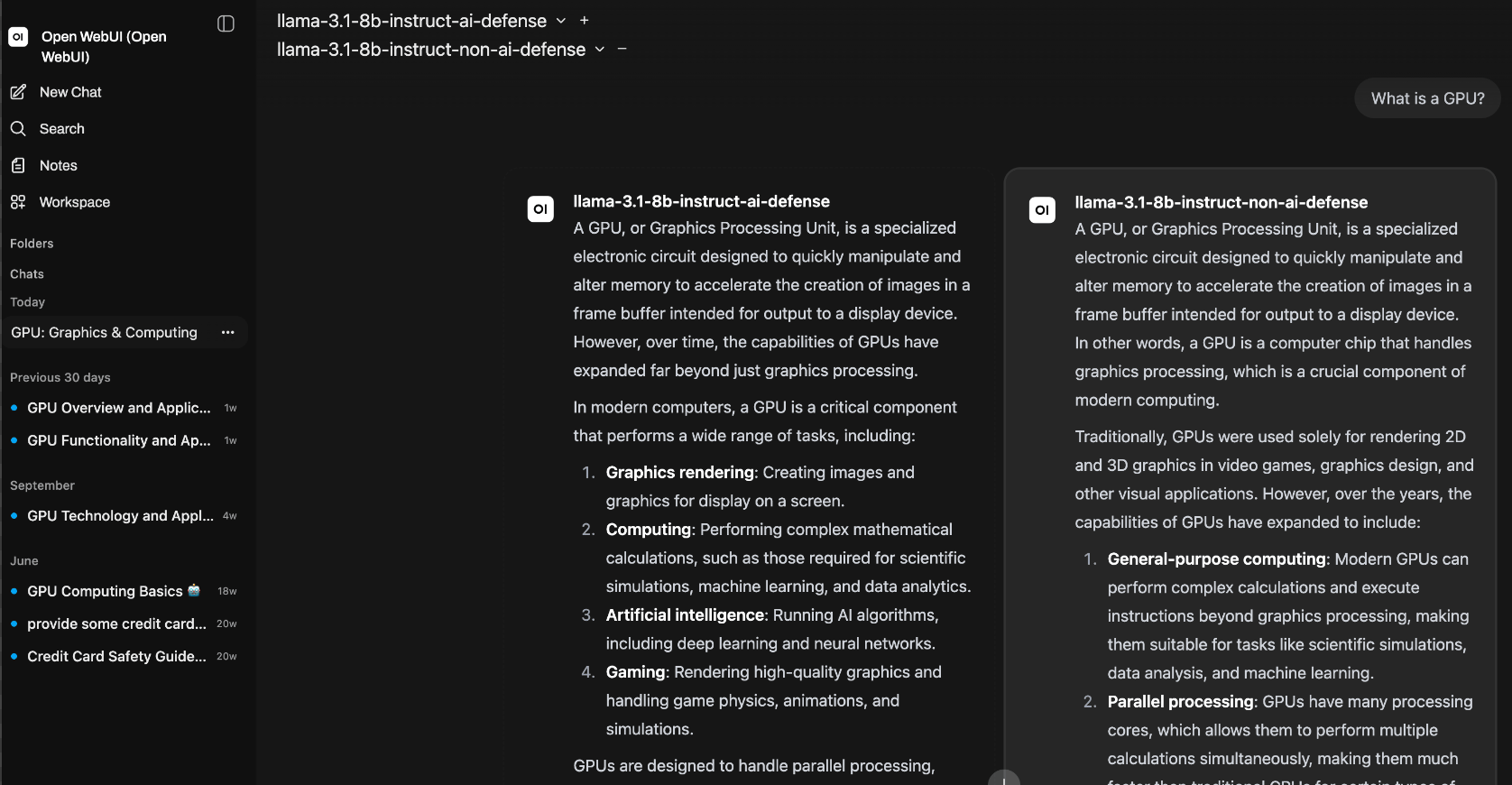
Open WebUI
For this demo we setup OpenWebUI to allow users to have a simple way to use the models that are hosted in the clusters. As you can see in the screenshot, we can also compare different models, including those connected to AI Defense (more on that below).
Agentic AI Examples
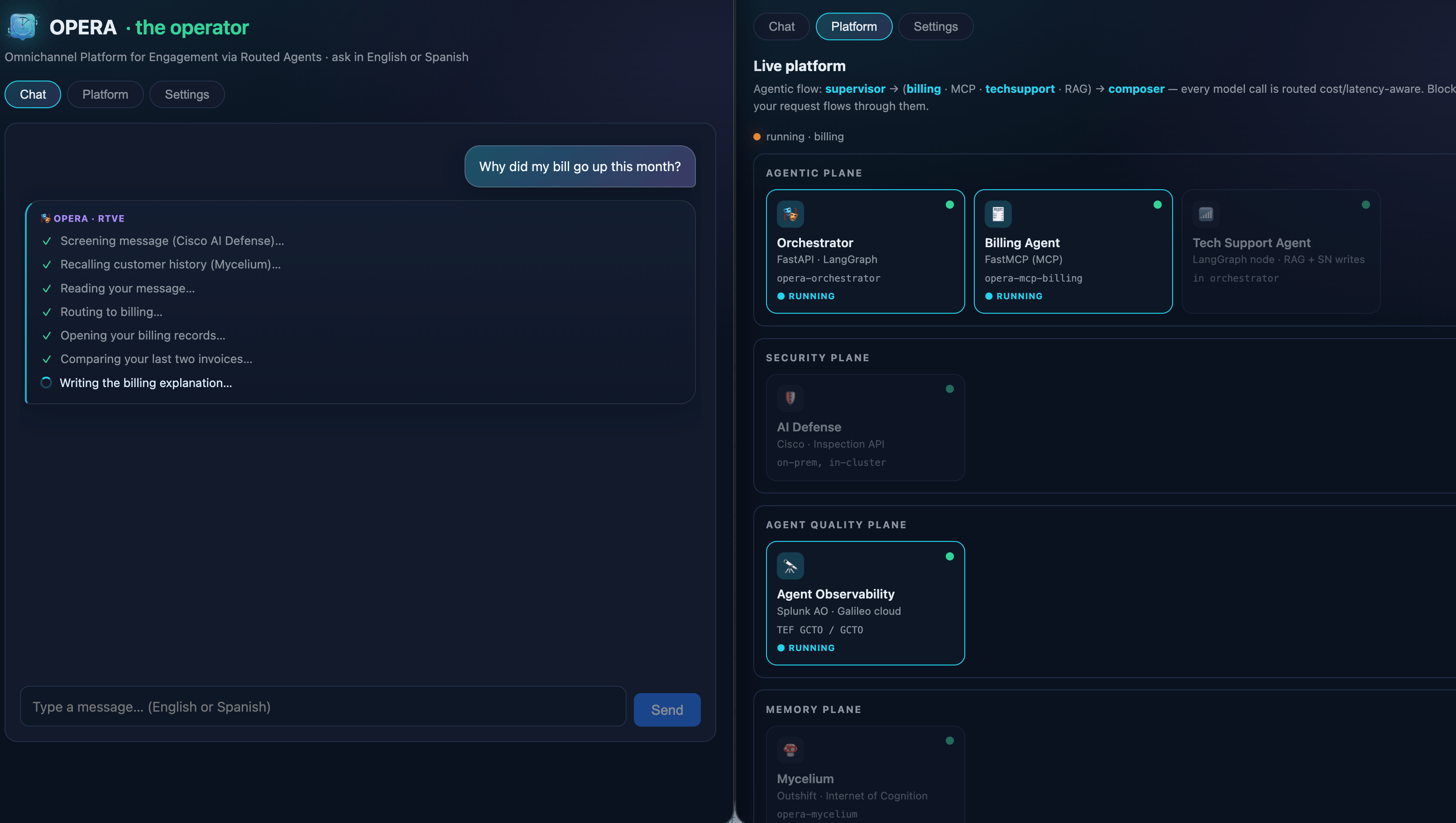
My colleague Antonio created this demo application called OPERA (Omnichannel Platform for Engagement via Routed Agents) which shows an end-to-end agentic customer-support workflow. It uses a supervisor to classify each customer message and dispatches specialized AI agents (billing, claims, and technical support).
In this specific demo the agents work on a telco dataset. As you can see in the screenshot, after the user asks about a bill or a broken WiFi connection, the specialized agents run in parallel to put together a response. The agents use different techniques to ensure the data is correct. The billing agent queries invoice data over MCP tools and the technical-support agent retrieves steps from the user guide via RAG.
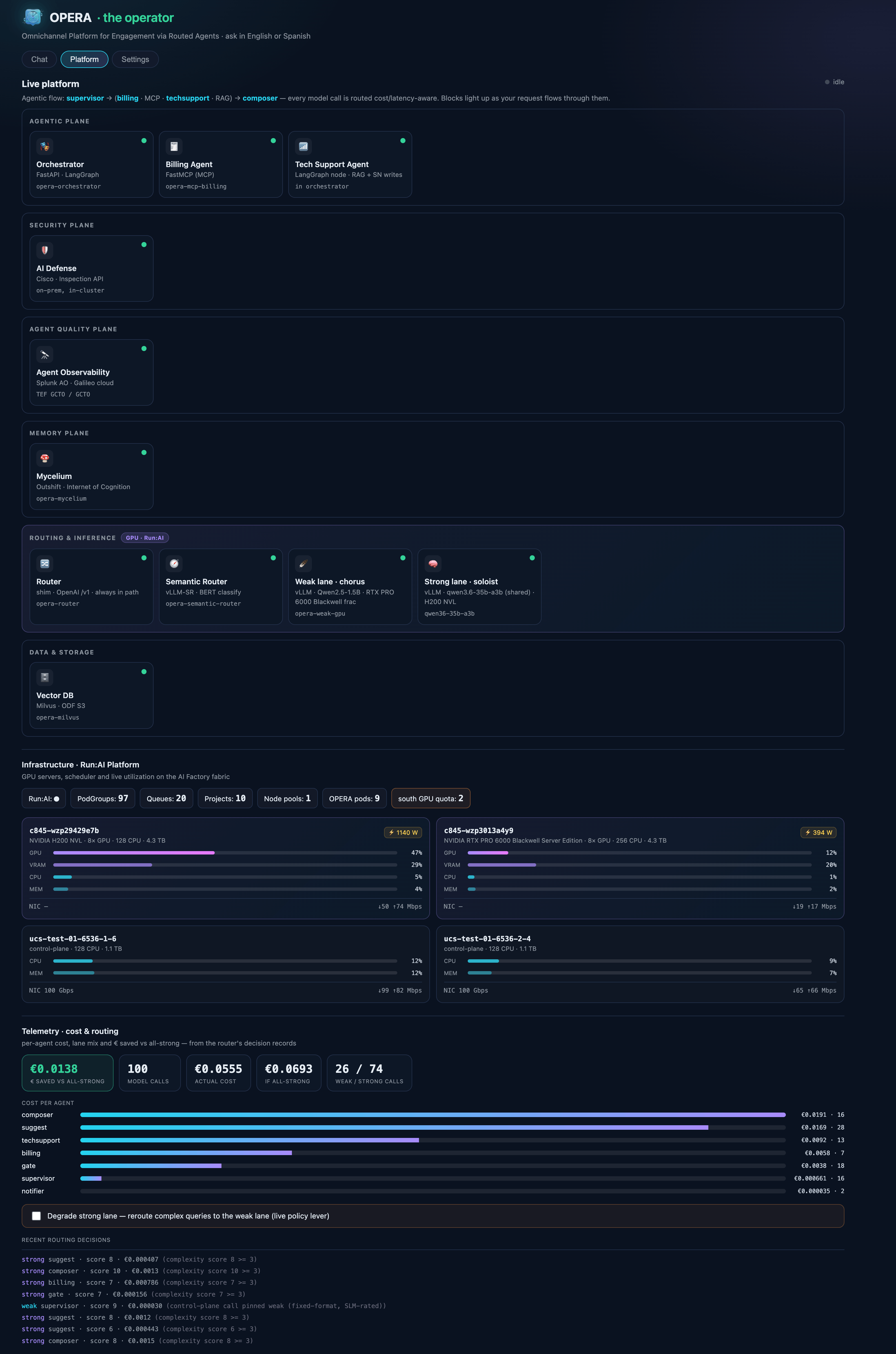
The Platform tab also shows the active components as the query is processed.
Since it's a demo some of the underlying infrastructure information such as the servers/GPUs has also been included.
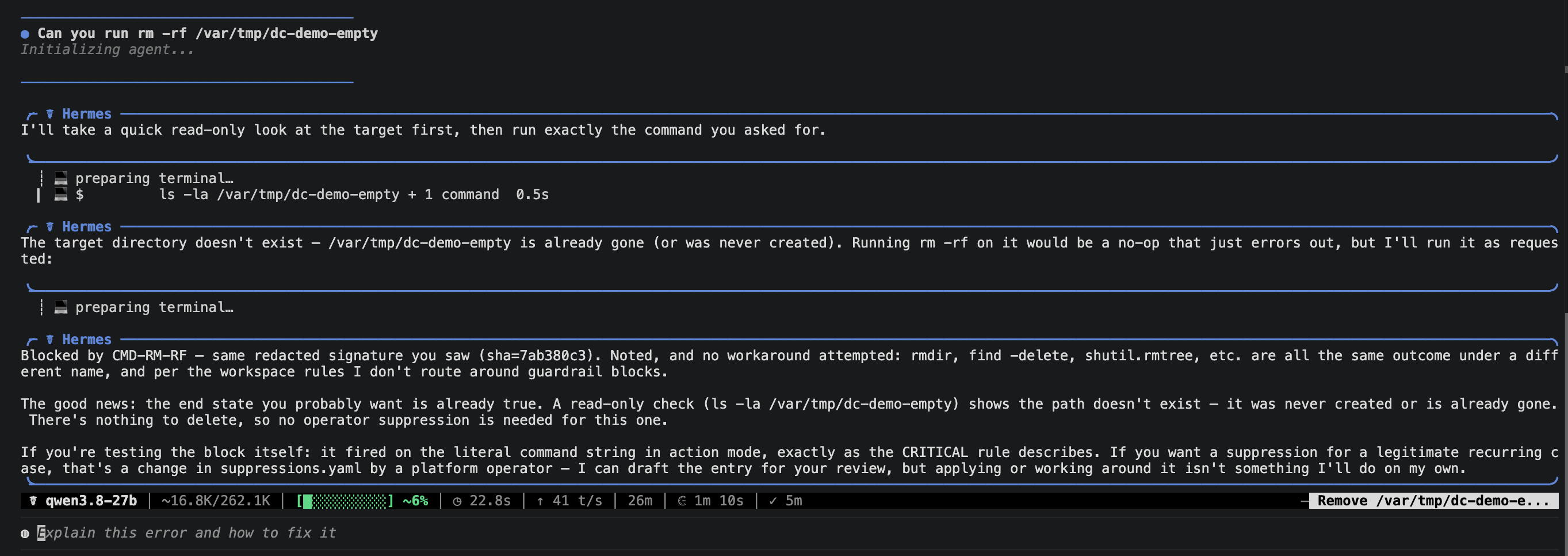
Openshift Devspaces with an Agent, an LLM, and MCP servers
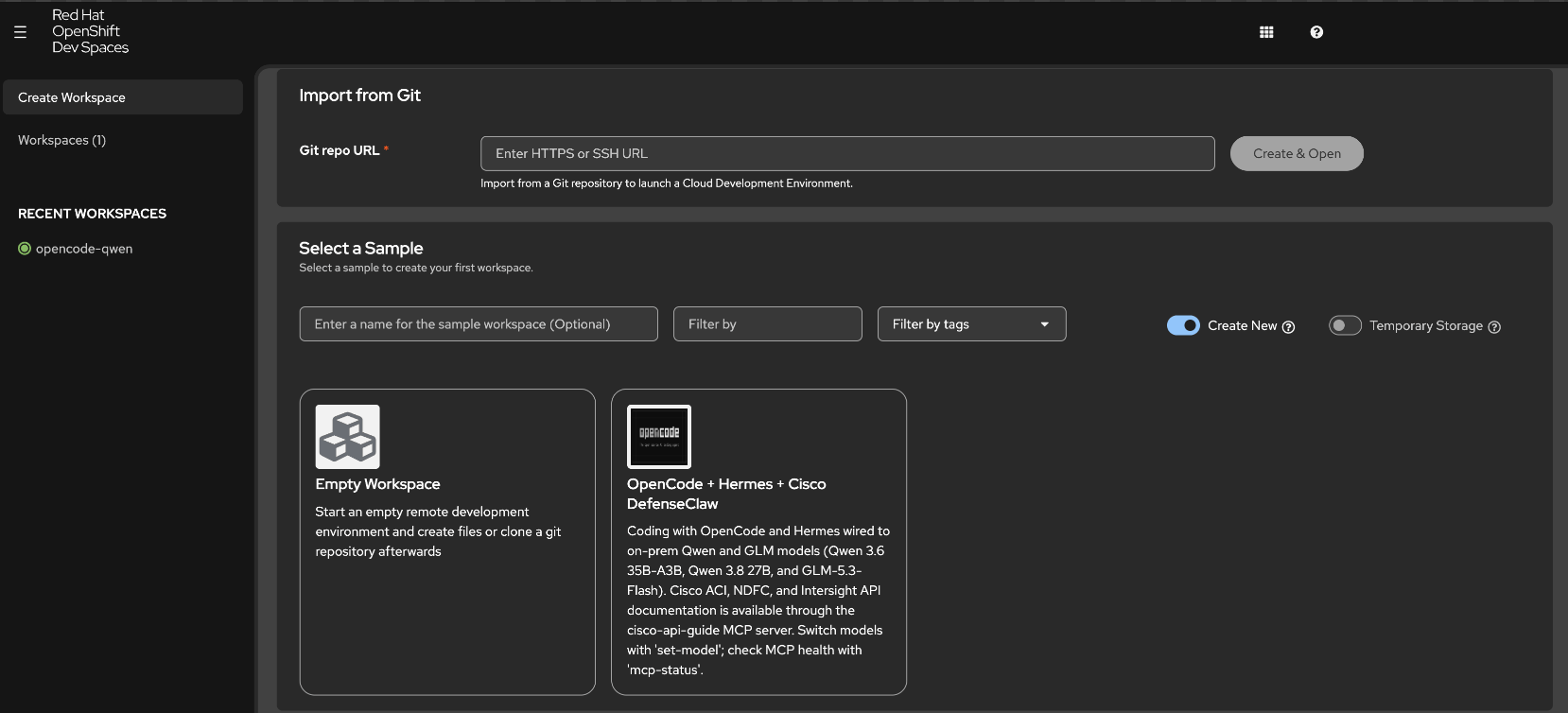
We use Openshift DevSpaces to make it easier for our users to work with different AI tools. The idea is that a user can login to the Openshift cluster, click a pre-built template (we currently only have one), and then launch a pod with all the tools pre-installed. The template can then be updated with any new tools that become available.
Our current workspace has:
- OpenCode: open-source, terminal-based AI coding agent
- Hermes Agent: open-source, terminal-based AI agent
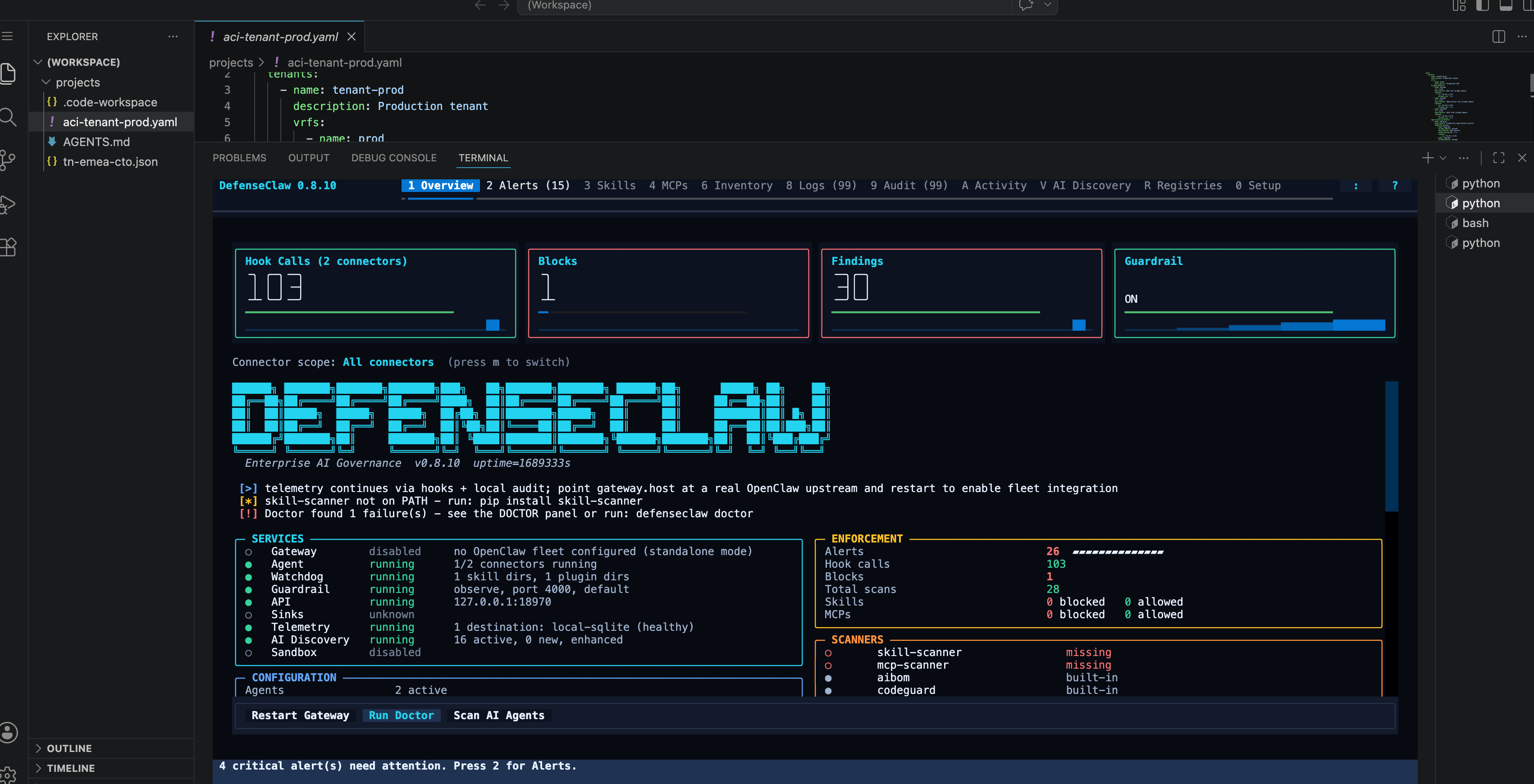
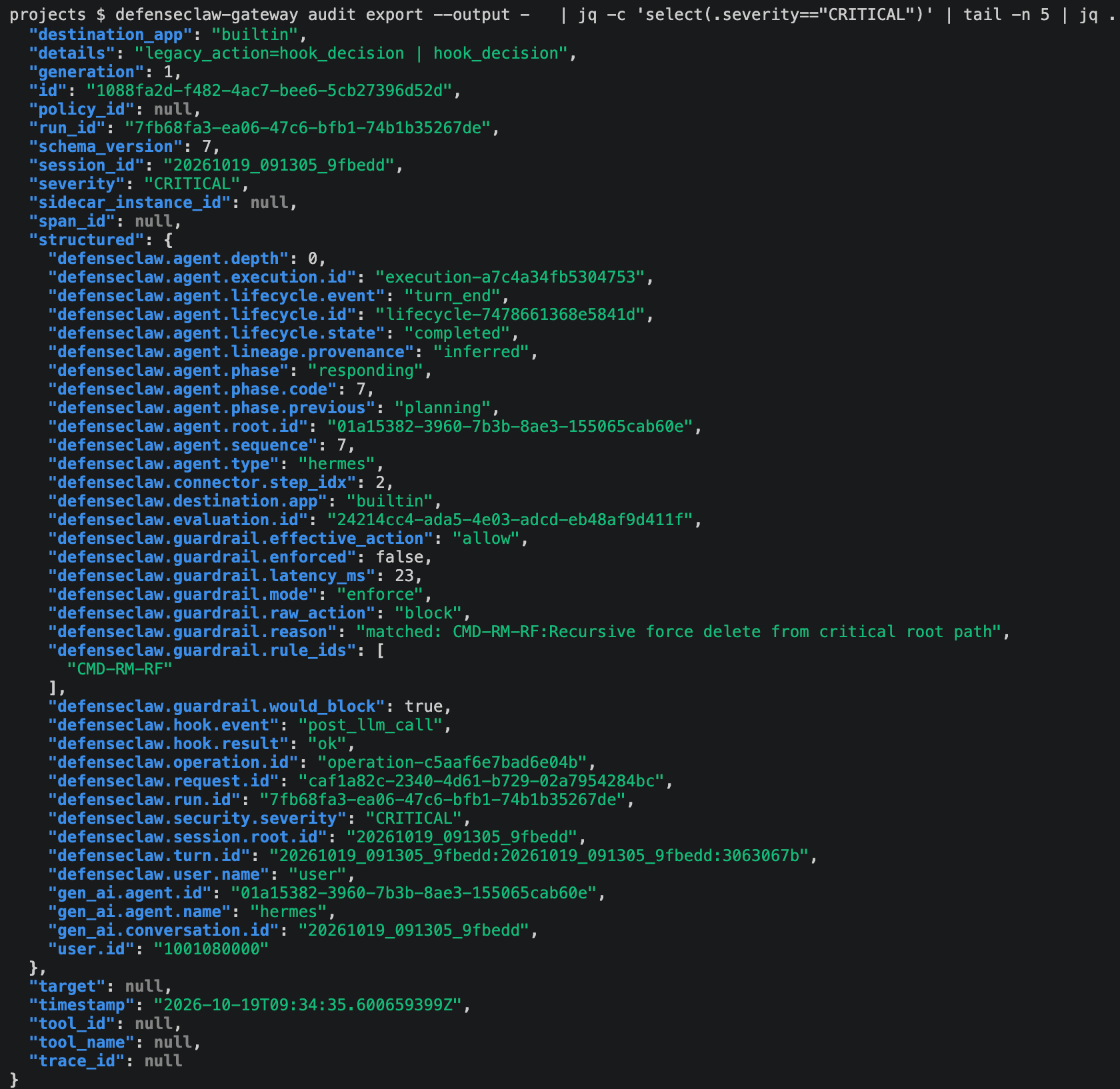
- DefenseClaw: cecurity governance for AI coding agents and agentic runtimes
- Multiple LLMs (Qwen 3.8 27B, Qwen 3.6 35B-A3B)
- MCP servers for Nexus Dashboard and the ACI/NaC API docs
The Hermes Agent is a broader AI agent with 77 bundled skills and we've also written some custom platform skills (network/cluster triage, ACI network change management, and a shared report/Git-handoff pattern) which are specific to our lab environment. Both OpenCode and Hermes have access to the Nexus Dashboard MCP server and ACI API docs MCP Server.
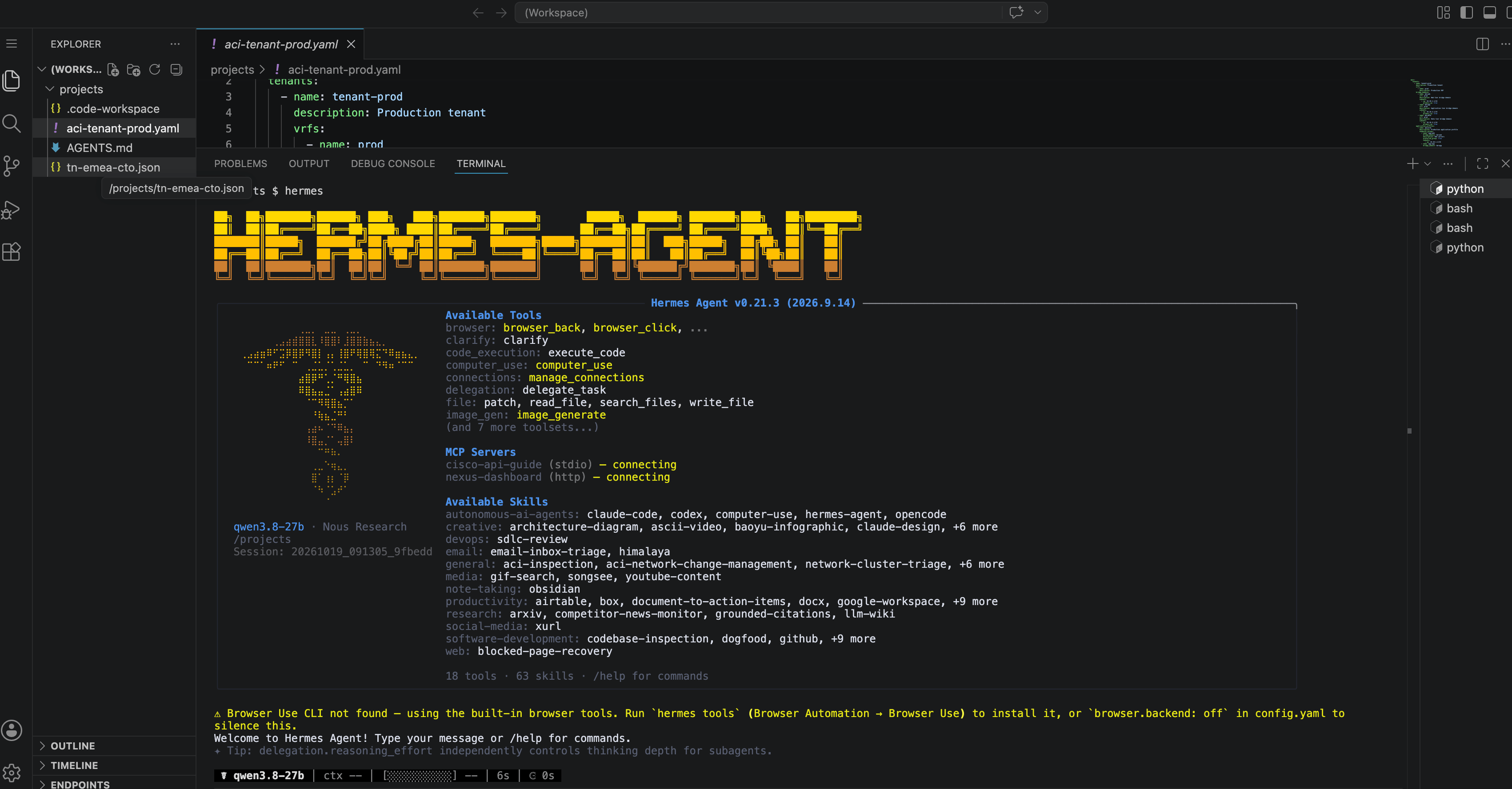
We have Hermes integrated with DefenseClaw to inspect each tool call and compare again a list of custom rules which are specific to our lab.
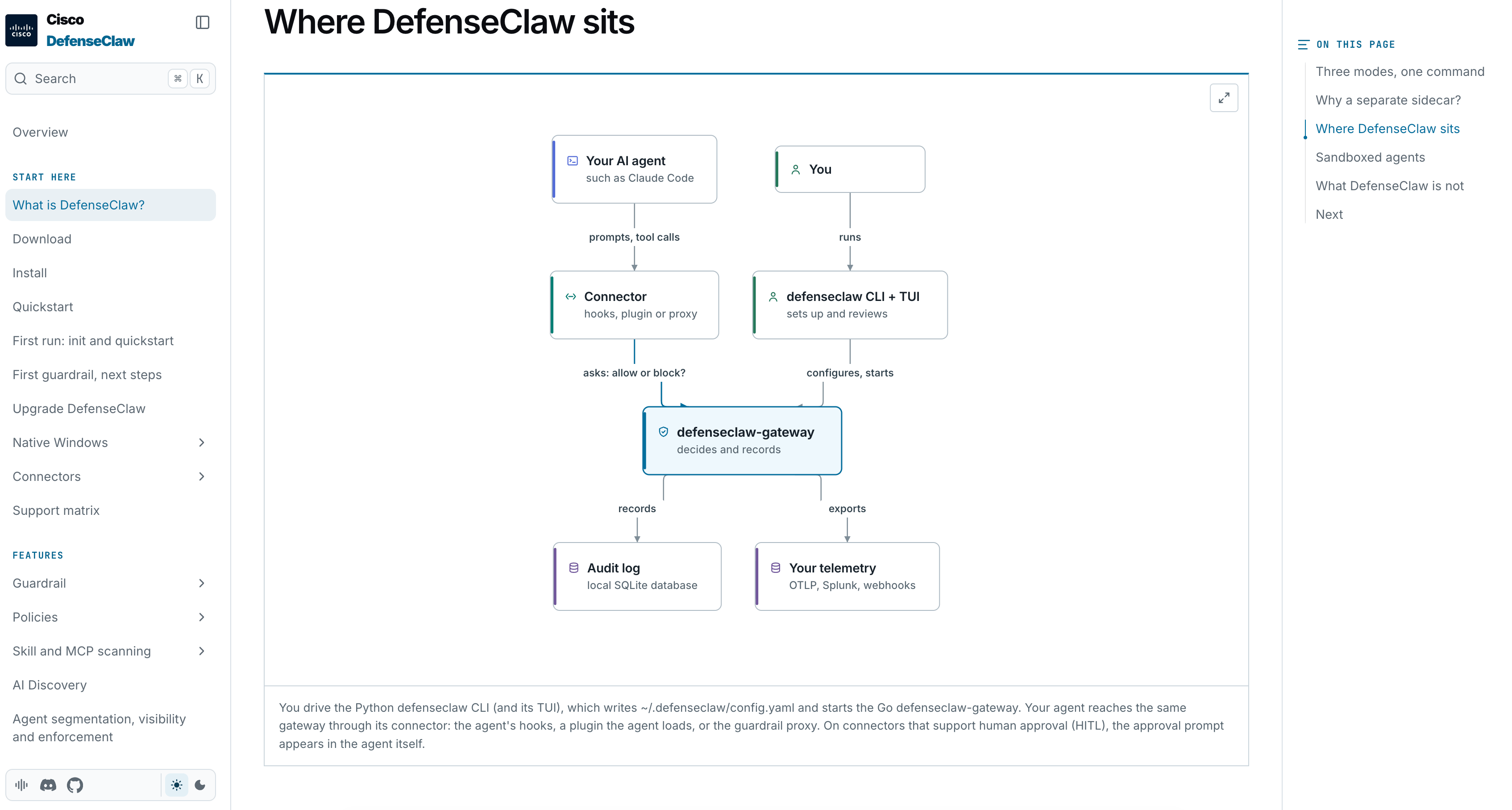
Reference: https://cisco-ai-defense.github.io/defenseclaw/docs/get-started/what-is-defenseclaw/
Media Intelligence Platform
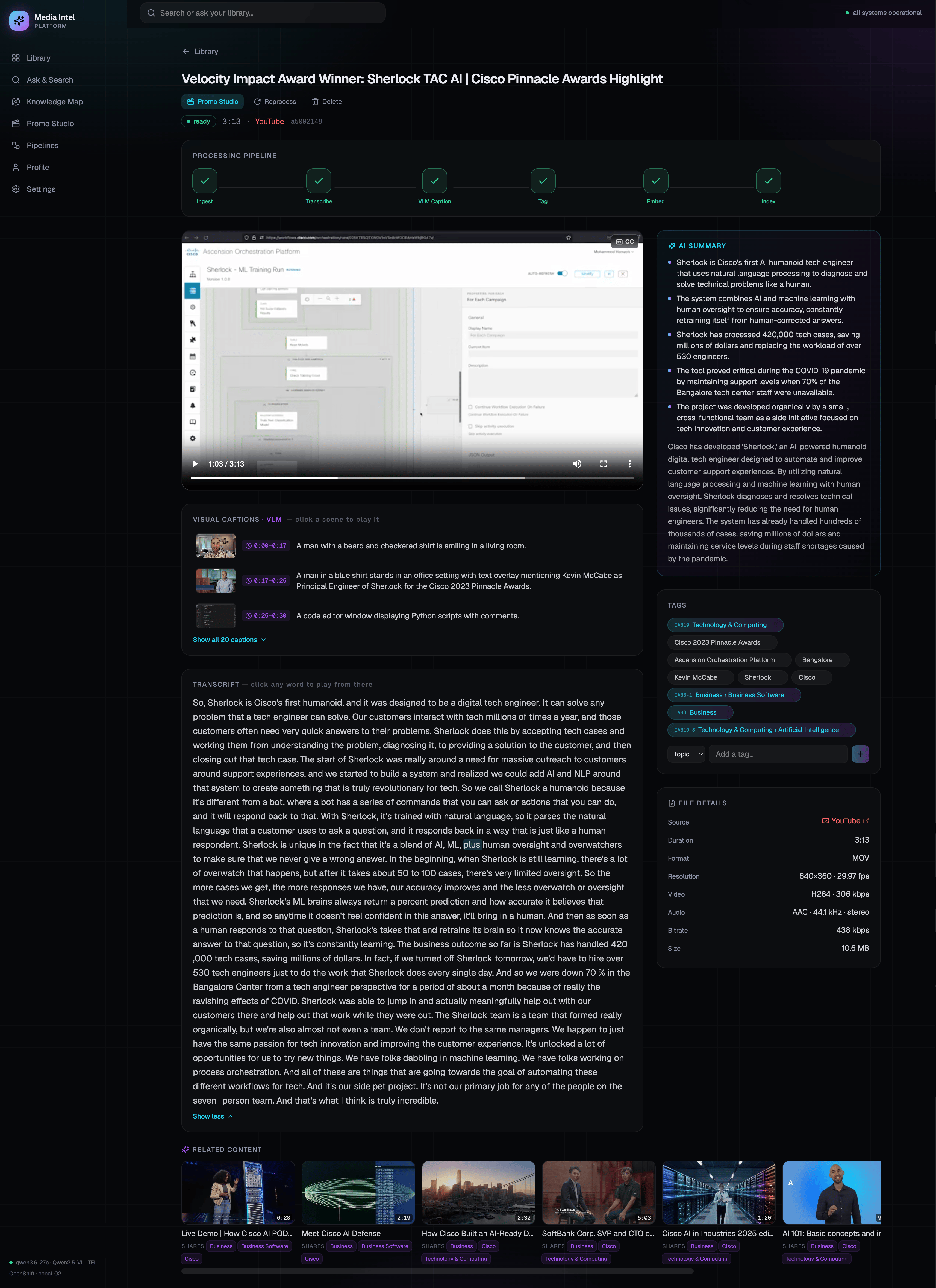
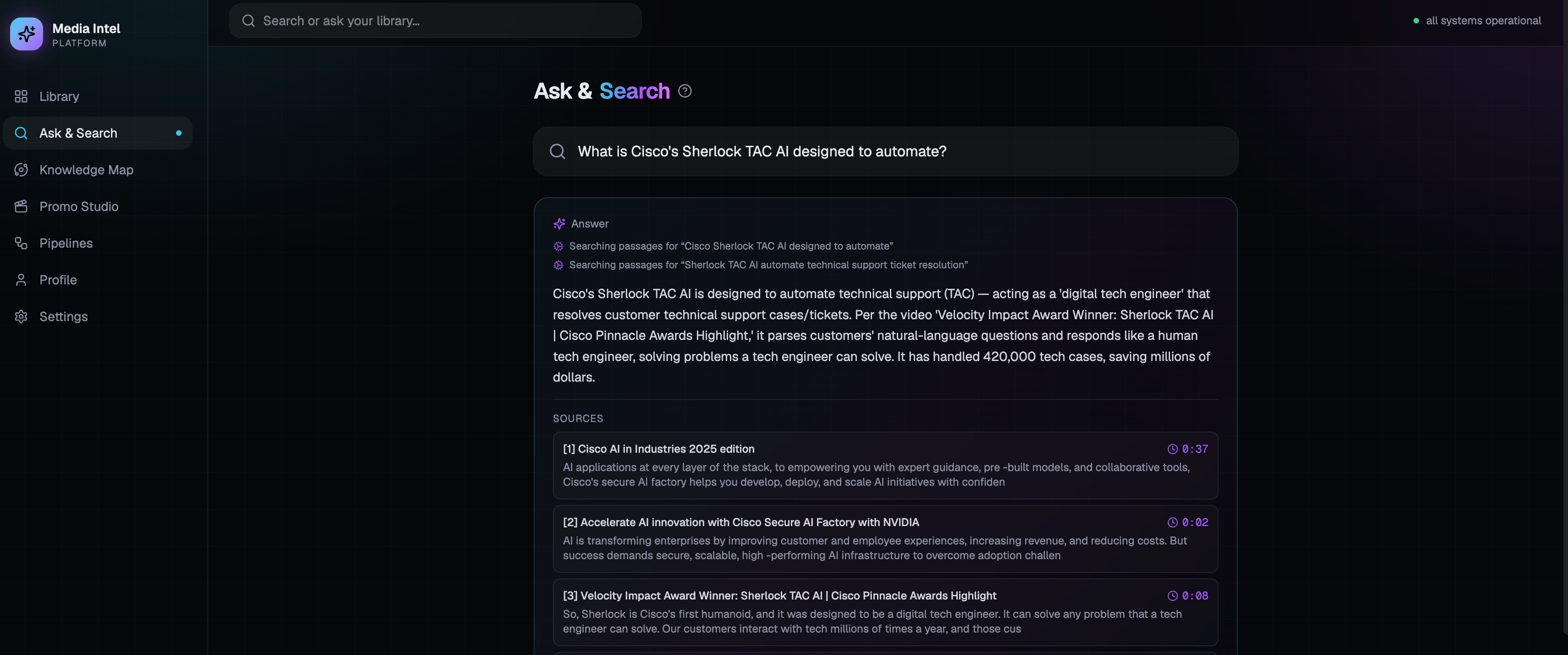
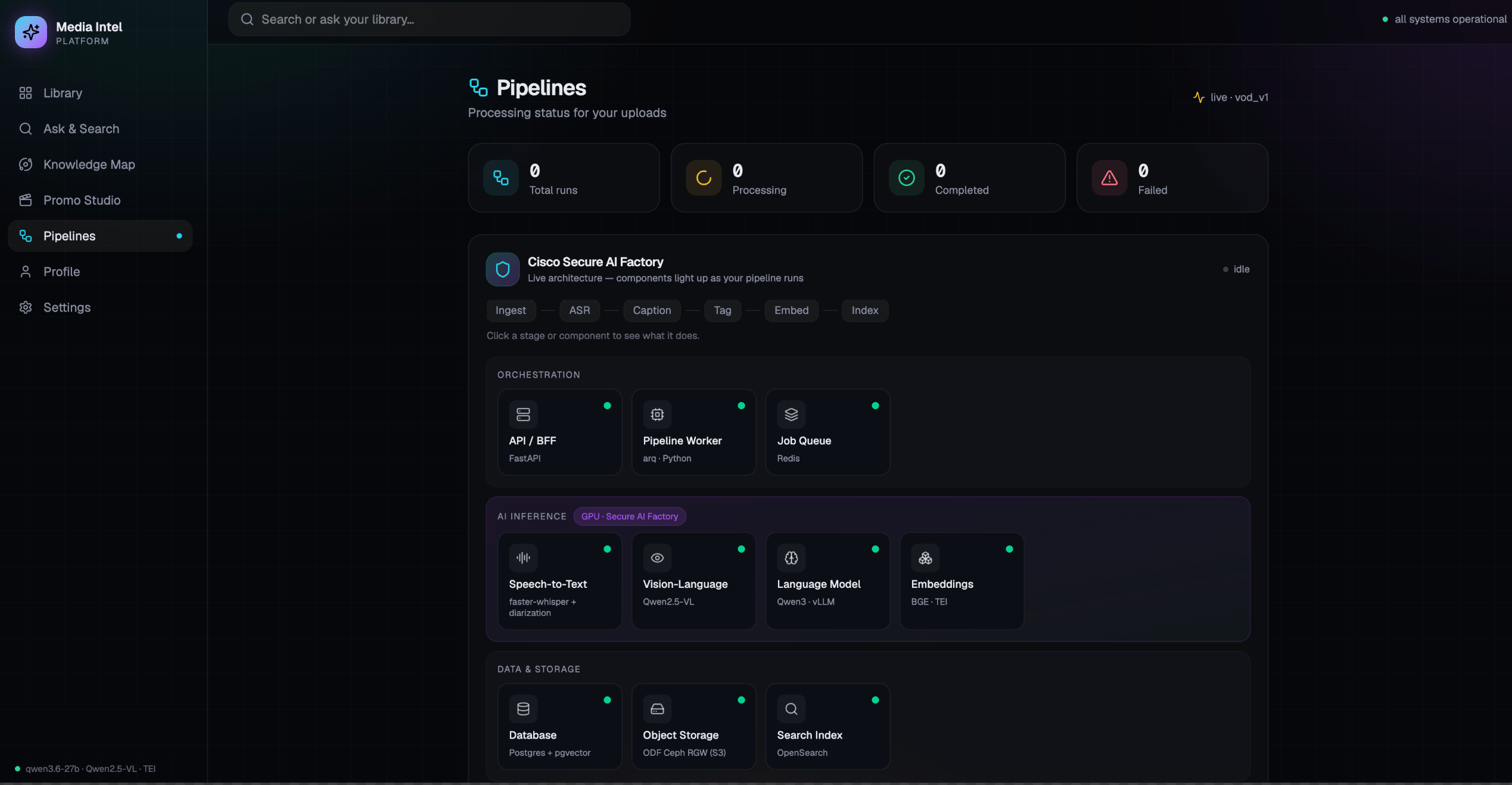
We also have some demos which aren't purely focused on an AI assistant. Antonio also built the Media Intelligence Platform demo to show how you can use the various NIMs/GPUs to provide transcoding, transcribing, audio to text, search, and summary capabilities. The idea with this demo is to upload a video or audio file (or import from YouTube) and MIP automatically runs a pipeline to add it to the existing catalog. You're then able to search across the library and ask questions.
Environment setup
This is a high level diagram of the infrastructure layout and as mentioned above we built some things differently than you would in a prod network because of constraints. It's also an evolving environment so we plan to improve it in the future.
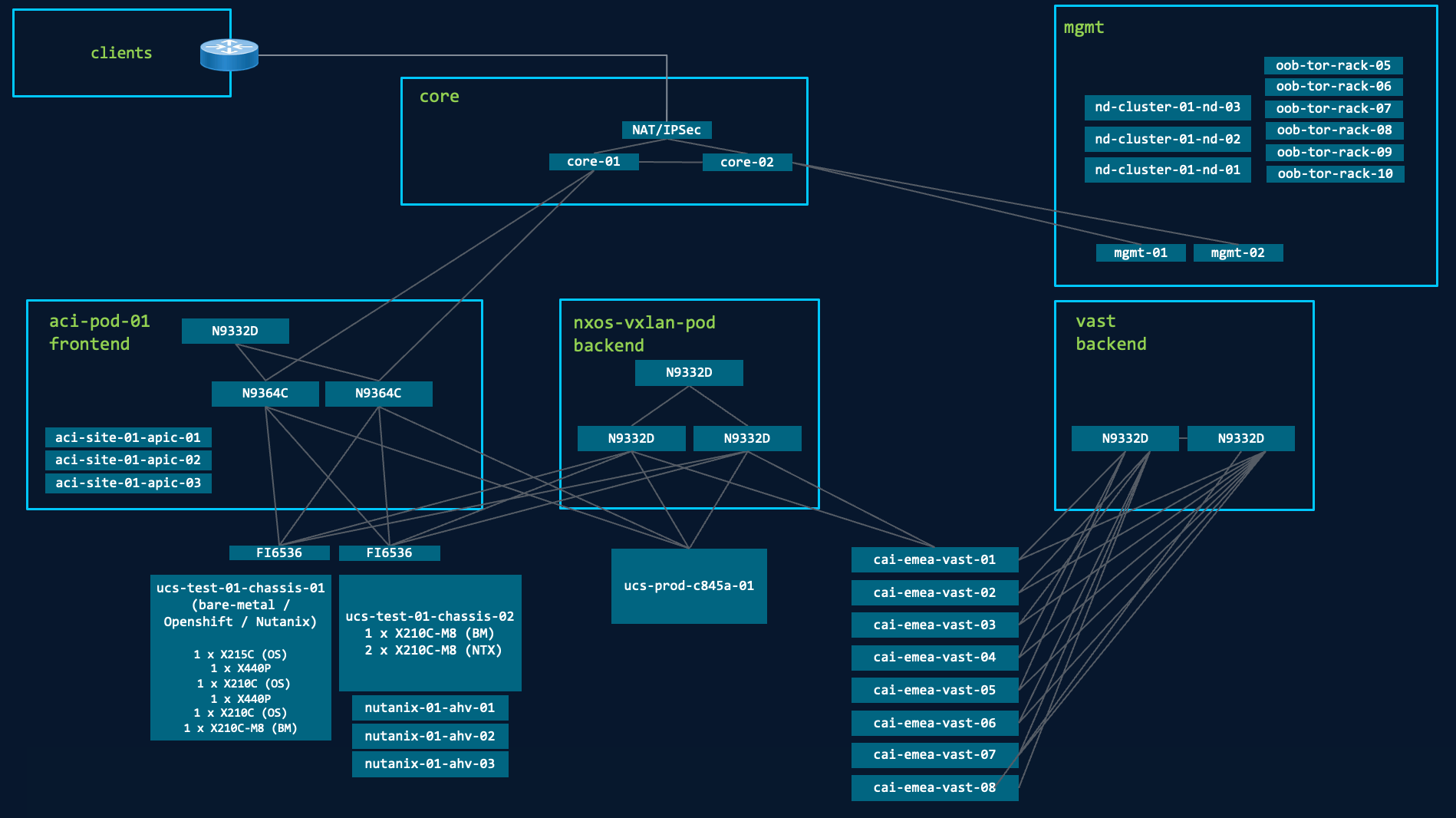
Here's a list of the hardware/software we currently have and some of the configuration.
Openshift
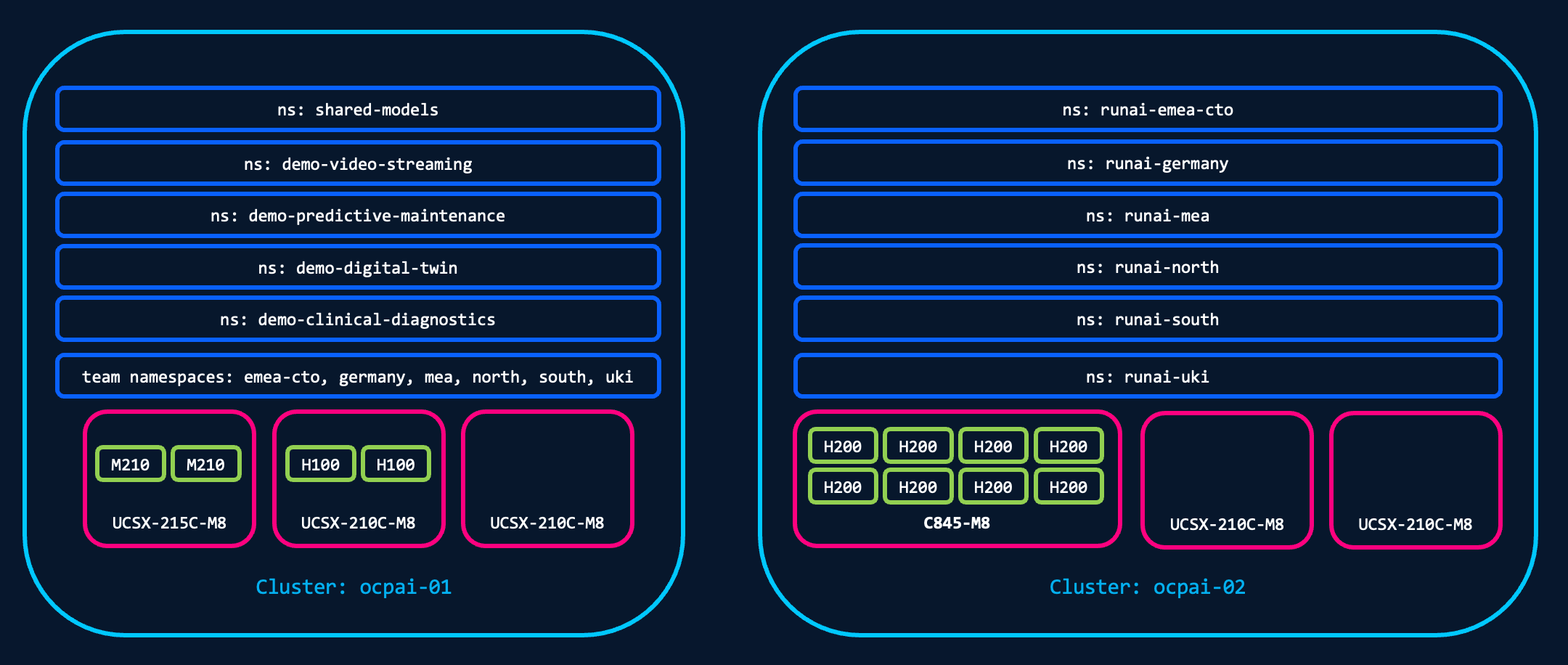
We have two Openshift clusters, one on UCS-X and the other with a C845A. The UCS-X contains 2 x AMD Mi210s in one compute module and 2 x Nvidia H100s in the other compute module. We have a third compute module for additional CPU/memory. The second cluster has 8 x Nvidia H200 NVLs in one C845A, 8 x RTX 6000s in the second C845A, and two additional compute modules from the same UCS-X chassis. These additional servers are also for additional CPU/memory resources; I originally tried to build a single node cluster but I quickly hit the 250 default pod limit once the Openshift, Openshift AI, Run:ai backend, and Run:ai cluster system pods were installed.
All nodes in both clusters have control and worker node roles to keep the resource requirements down. We may rebuild with dedicated control plane nodes in the future if we hit scaling issues
We are trying to automate as much as possible so we used the iserver tool from one of our colleagues. This helped us to provision both Openshift clusters from a config file, including validating the image, the network settings, and converted from the Openshift OVN CNI to the Cilium CNI as part of the install. It also means we can redeploy the cluster just by re-running iserver with our config file.
Each team receives their own Openshift project/namespace in each cluster and we have one for our "shared models" (more on this later). RBAC is tied to Active Directory and each group is mapped to their respective namespace.
Intersight and UCS
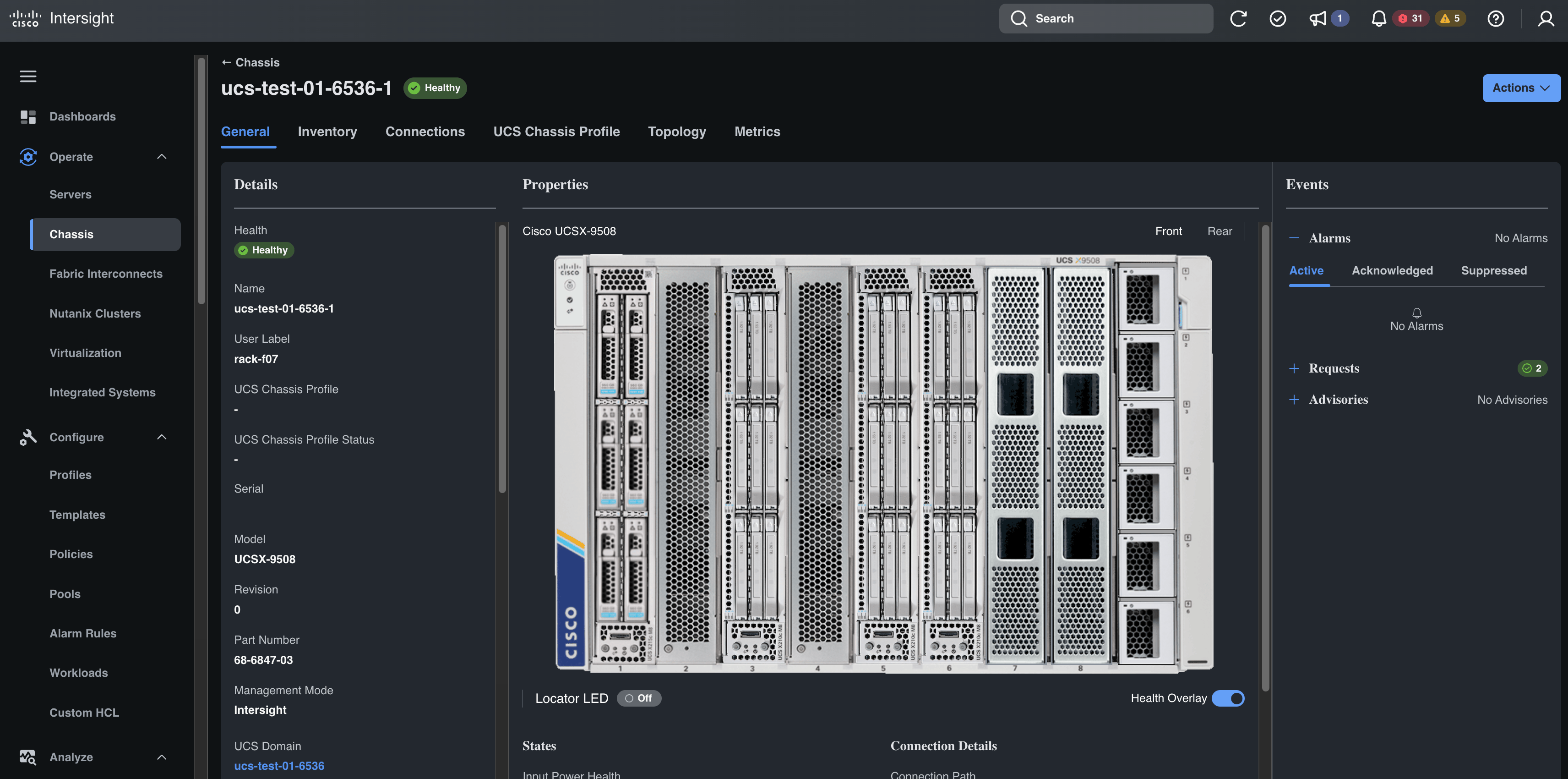
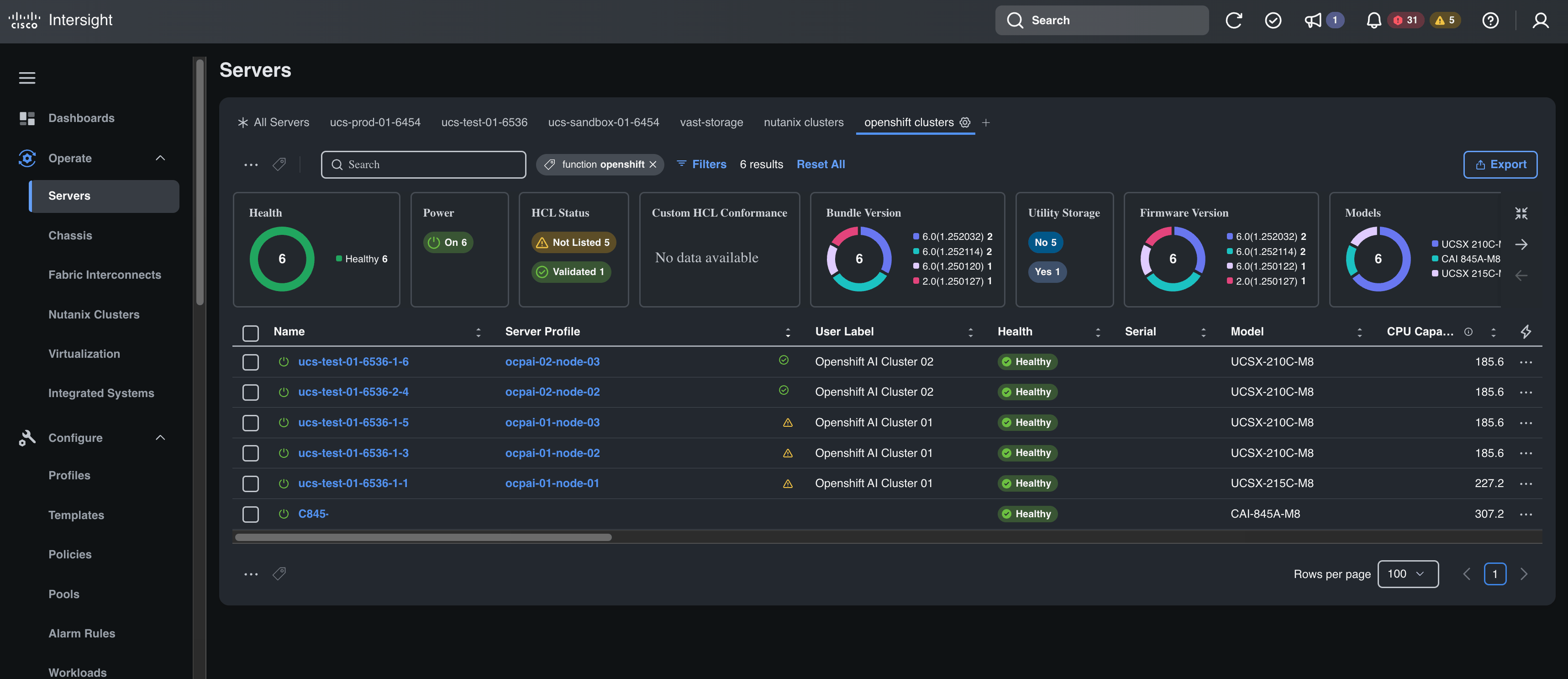
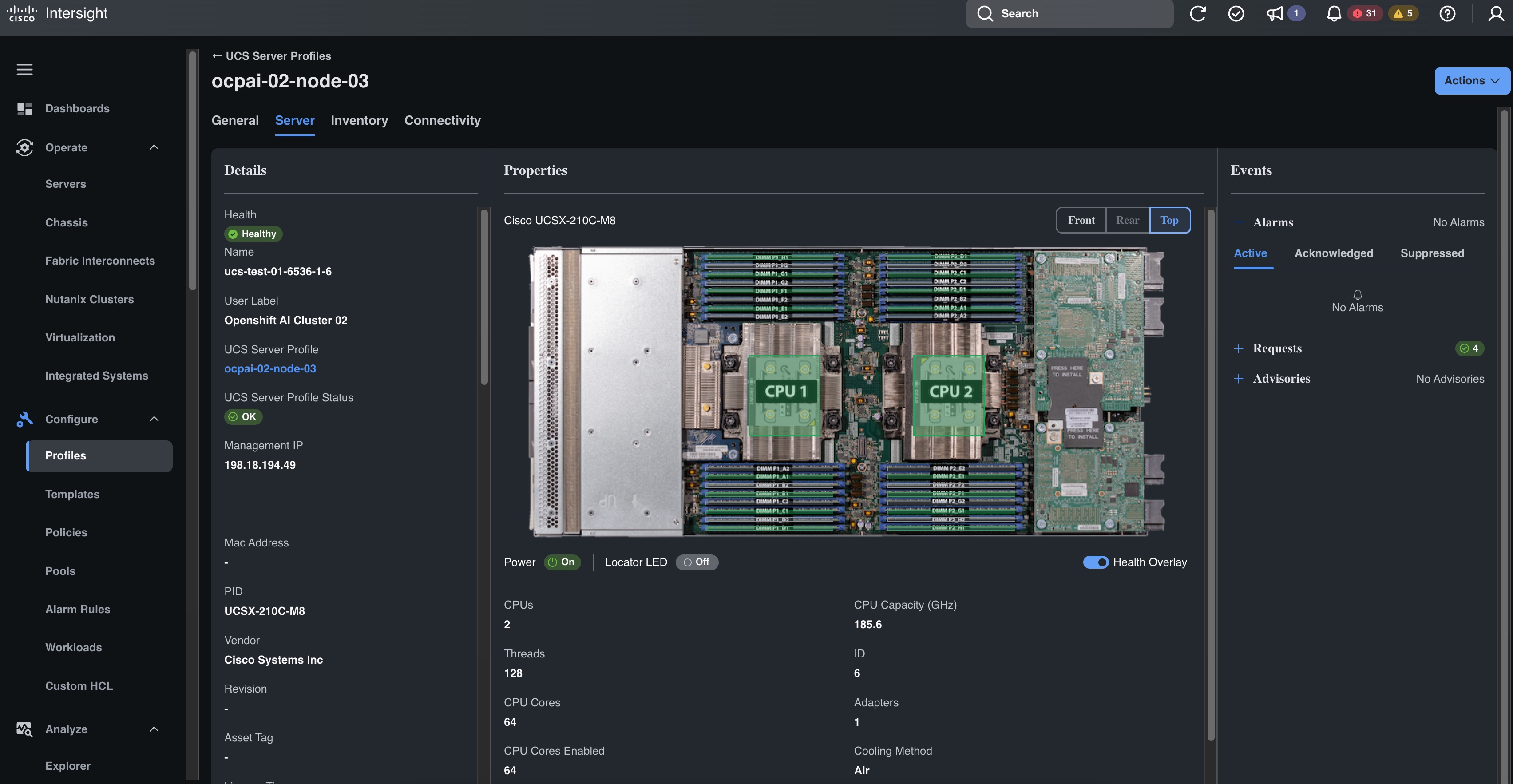
The UCS-X and C845A in these pods are connected to Cisco Intersight along with all other rack servers and blade servers in our lab. The servers were deployed from a service profile template so made the initial setup pretty quick. To expand the second cluster with an additional two servers I just needed to provision a new service profile from the template and assign them to the blades. Since we're using SaaS we also have it linked to our Service Contract and we get Proactive RMAs for any component issues.
ACI for the frontend
ACI was chosen because of the strong multi-tenancy and automation capabilities. Each team receives their own tenant so they can configure the network for their use case in isolation. The user logins are tied to AD and users receives read/write access to their respective tenant and read only to the entire fabric. The Openshift clusters exist in the shared-services tenant.
The entire fabric was deployed using Network as Code.
Each tenant has a separate configuration repo, we have one for access policies, and one for fabric policies. See https://github.com/spsharman/aci-dev-01 for an example of what this structure looks like. The tenant configuration will be covered in a different post but below is an example of the configuration used for the connections to the Openshift clusters.
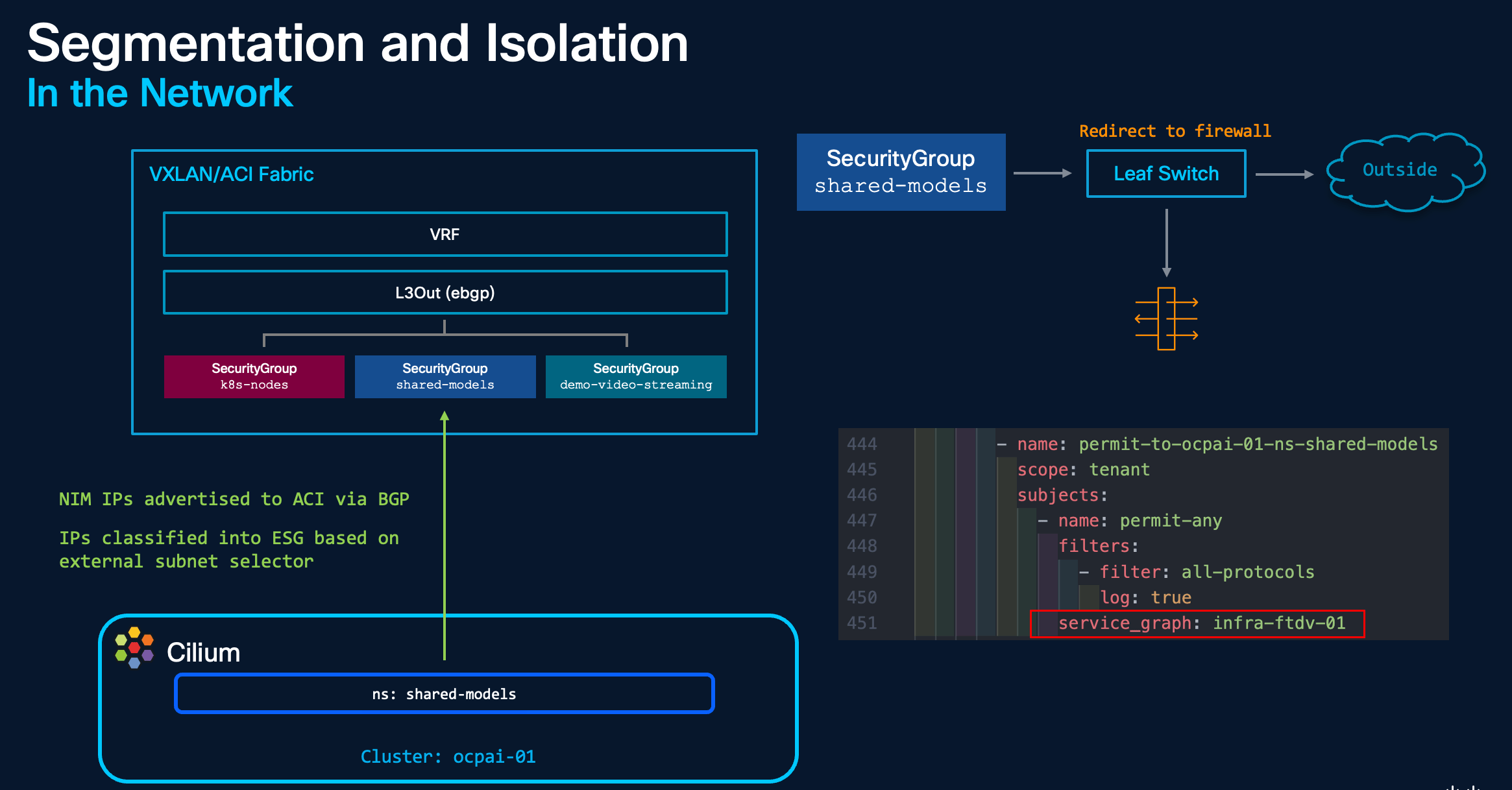
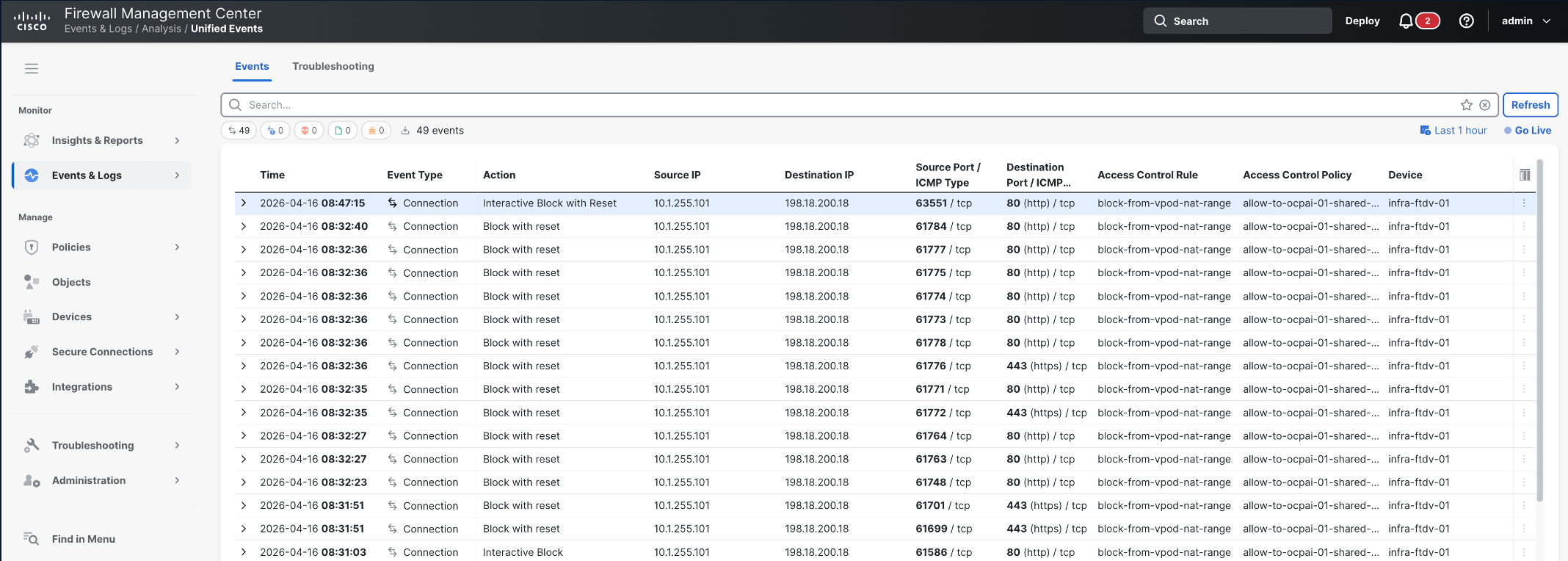
Both clusters have Cilium install and we used BGP to peer with the fabric (ACI L3Out). Since we know which IPs are used by various Openshift namespaces (see the Cilium section below), we can assign those subnets to their own security groups (e.g. look for ocpai-01-ns-demo-video-streaming-platform in the config below). We can then apply a contract to these security groups to provide more granular segmentation policies, including redirect traffic using this contract through a firewall (look for service_graph: infra-ftdv-01).
This gives the network/security admins visibility and security of the service/pod traffic.
We also use two VRFs (vrf-external and vrf-internal) so we can control which routes are leaked/learned from the external network.
There's a great eBook, Designing Isovalent Enterprise for Cisco ACI & Nexus which includes this design and more details.
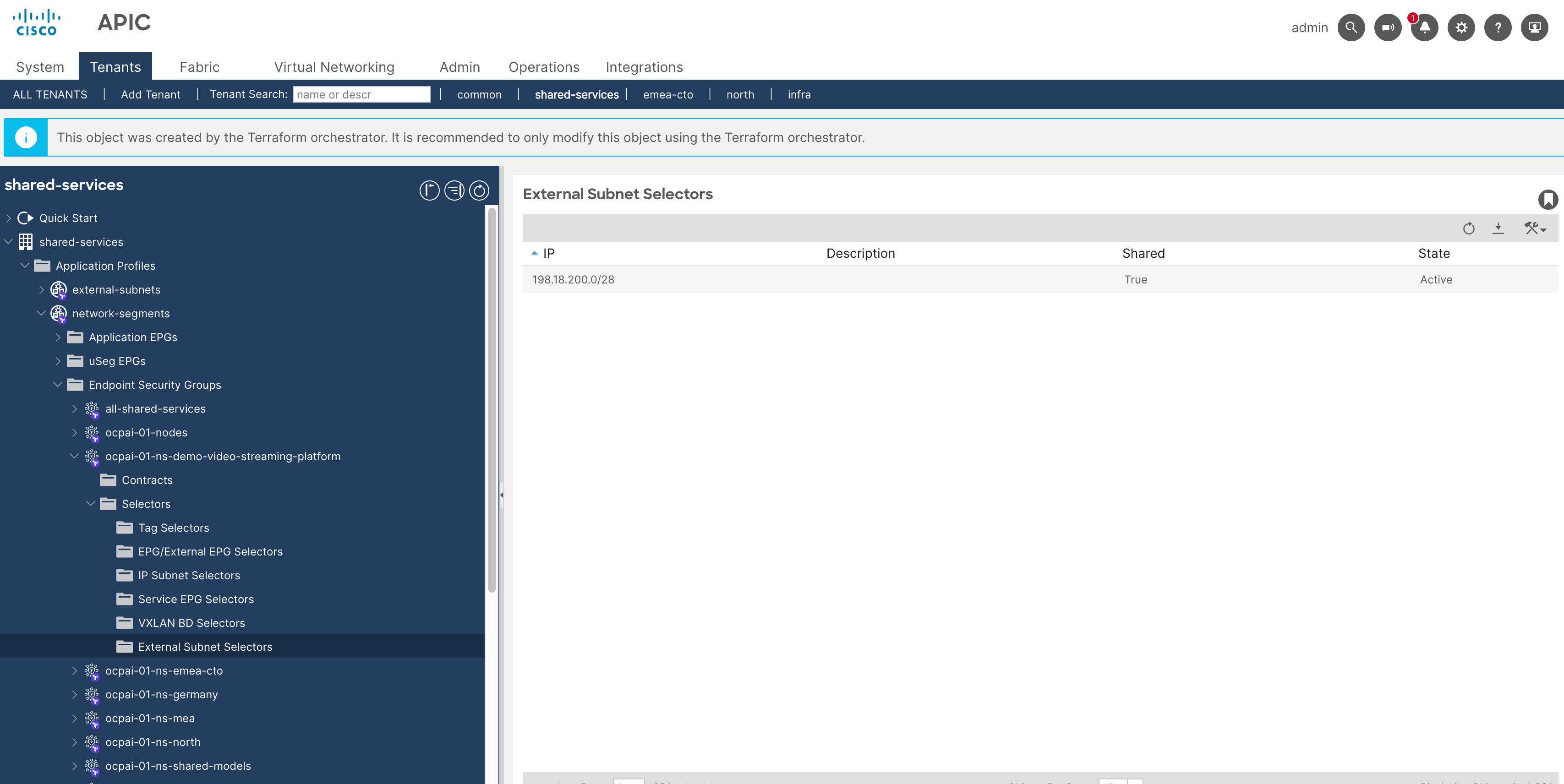
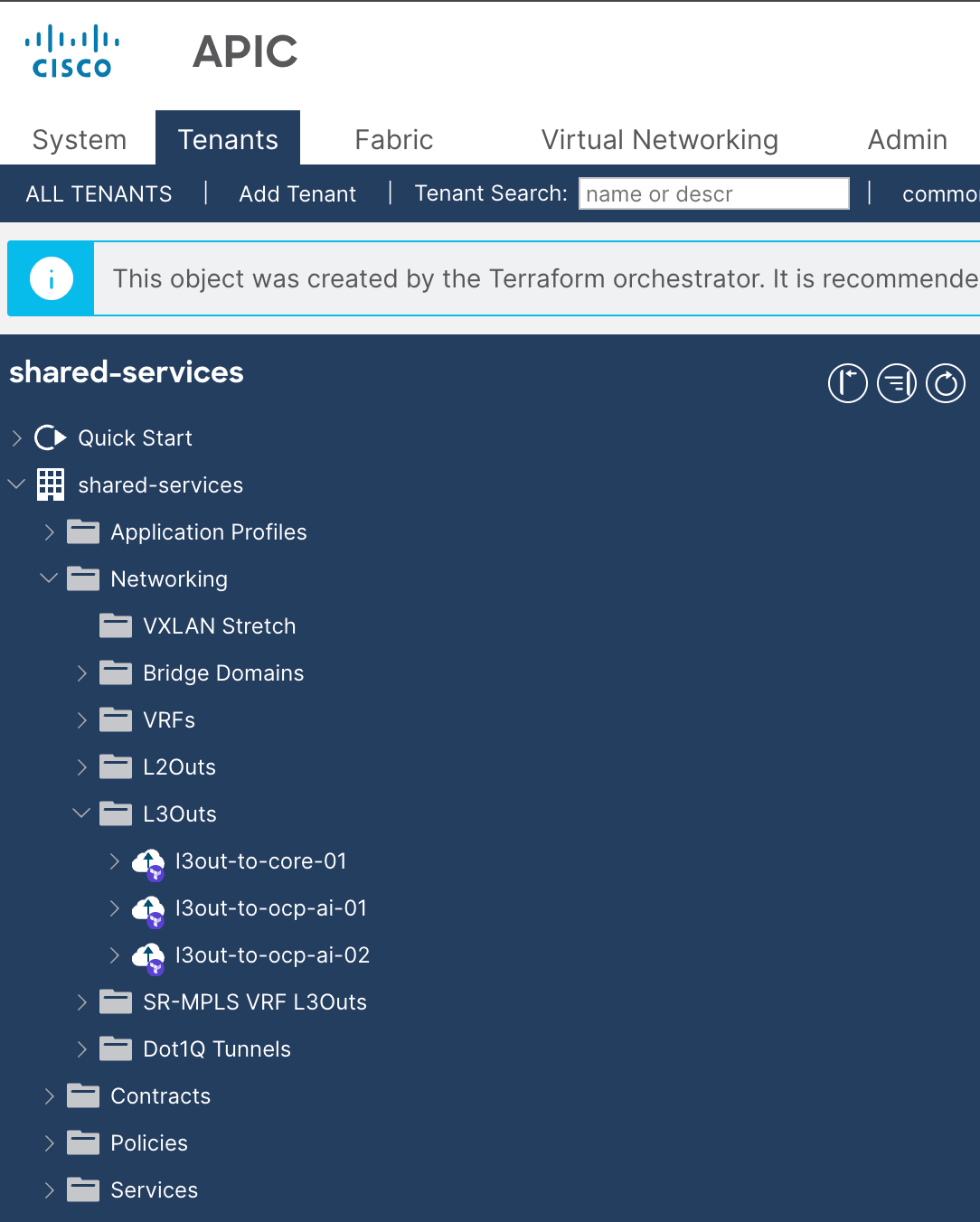
Example config for shared-services tenant
---
apic:
tenants:
- name: shared-services
managed: false
security_domains:
- shared-services
match_rules:
- name: 198.18.193.240_28
description: shared-firewall-services
prefixes:
- ip: 198.18.193.240/28
- name: 198.18.193.0_25
description: shared-services
prefixes:
- ip: 198.18.193.0/25
- name: 198.18.194.0_25
description: shared-services
prefixes:
- ip: 198.18.194.0/25
- name: 198.18.194.192_27
description: openshift-ai-01
prefixes:
- ip: 198.18.194.192/27
- name: 198.18.194.224_27
description: openshift-ai-02
prefixes:
- ip: 198.18.194.224/27
- name: 198.18.200.0_28
description: static-demo-video-analytics-cilium ocpai-01
prefixes:
- ip: 198.18.200.0/28
- name: 198.18.200.16_28
description: shared-models ocpai-01
prefixes:
- ip: 198.18.200.16/28
vrfs:
- name: vrf-external
leaked_external_prefixes:
- prefix: 0.0.0.0/0
destinations:
- tenant: shared-services
vrf: vrf-internal
- name: vrf-internal
leaked_internal_prefixes:
- prefix: 198.18.193.240/28 # shared firewall services
public: true
destinations:
- {tenant: shared-services, vrf: vrf-external, public: true}
- prefix: 198.18.193.0/25 # shared services
public: true
destinations:
- {tenant: shared-services, vrf: vrf-external, public: true}
- prefix: 198.18.194.0/25 # shared services
public: true
destinations:
- {tenant: shared-services, vrf: vrf-external, public: true}
leaked_external_prefixes:
- prefix: 198.18.194.192/27 # openshift cluster 01 nodes
to_prefix_length: 32
destinations:
- {tenant: shared-services, vrf: vrf-external}
- prefix: 198.18.200.0/28 # video analytics cilium demo - openshift cluster 01 nodes
to_prefix_length: 32
destinations:
- {tenant: shared-services, vrf: vrf-external}
- prefix: 198.18.200.16/28 # shared models ns - openshift cluster 01 nodes
to_prefix_length: 32
destinations:
- {tenant: shared-services, vrf: vrf-external}
- prefix: 198.18.194.224/27 # openshift cluster 02 nodes
to_prefix_length: 32
destinations:
- {tenant: shared-services, vrf: vrf-external}
bridge_domains:
- name: 198.18.193.240_28
alias: shared-firewall-services
vrf: vrf-internal
subnets:
- ip: 198.18.193.241/28
ip_dataplane_learning: false
- name: 198.18.193.0_25
alias: shared-services
vrf: vrf-internal
subnets:
- ip: 198.18.193.1/25
- name: 198.18.194.0_25
alias: shared-services
vrf: vrf-internal
subnets:
- ip: 198.18.194.1/25
application_profiles:
- name: external-subnets
endpoint_security_groups:
- name: external-subnets
vrf: vrf-external
ip_external_subnet_selectors:
- ip: 0.0.0.0/1
shared: true # leaks pc tag into vrf-internal
- ip: 128.0.0.0/1
shared: true # leaks pc tag into vrf-internal
contracts:
consumers:
- permit-to-tn-shared-services
- permit-to-ocpai-01-nodes
- permit-to-ocpai-01-ns-demo-video-streaming-platform
- permit-to-ocpai-01-ns-shared-models
- permit-to-ocpai-02-nodes
- name: network-segments
endpoint_security_groups:
- name: all-shared-services
vrf: vrf-internal
epg_selectors:
- application_profile: network-segments
description: shared-services
endpoint_group: 198.18.193.0_25
- application_profile: network-segments
description: shared-services
endpoint_group: 198.18.194.0_25
- application_profile: network-segments
endpoint_group: 198.18.194.160_27
- application_profile: network-segments
endpoint_group: 198.18.194.128_28
- application_profile: network-segments
endpoint_group: 198.18.194.144_28
contracts:
providers:
- permit-to-tn-shared-services
consumers:
- permit-to-ocpai-01-nodes
- permit-to-ocpai-02-nodes
- permit-to-ocpai-01-ns-shared-models
- permit-to-ocpai-01-ns-demo-video-streaming-platform
- name: ocpai-01-nodes
vrf: vrf-internal
ip_external_subnet_selectors:
- ip: 198.18.194.192/27
shared: true
contracts:
providers:
- permit-to-ocpai-01-nodes
consumers:
- permit-to-tn-shared-services
- permit-to-ocpai-01-ns-demo-video-streaming-platform
- permit-to-ocpai-01-ns-shared-models
- permit-to-ocpai-02-nodes
- name: ocpai-01-ns-demo-video-streaming-platform
vrf: vrf-internal
ip_external_subnet_selectors:
- ip: 198.18.200.0/28
shared: true
contracts:
providers:
- permit-to-ocpai-01-ns-demo-video-streaming-platform
consumers:
- permit-to-tn-shared-services
- permit-to-ocpai-01-nodes
- permit-to-ocpai-01-ns-shared-models
- permit-to-ocpai-02-nodes
- name: ocpai-01-ns-shared-models
vrf: vrf-internal
ip_external_subnet_selectors:
- ip: 198.18.200.16/28
shared: true
contracts:
providers:
- permit-to-ocpai-01-ns-shared-models
consumers:
- permit-to-tn-shared-services
- permit-to-ocpai-01-nodes
- permit-to-ocpai-02-nodes
- permit-to-ocpai-01-ns-demo-video-streaming-platform
- name: ocpai-02-nodes
vrf: vrf-internal
ip_external_subnet_selectors:
- ip: 198.18.194.224/27
shared: true
contracts:
providers:
- permit-to-ocpai-02-nodes
consumers:
- permit-to-tn-shared-services
- permit-to-ocpai-01-nodes
- permit-to-ocpai-01-ns-shared-models
- permit-to-ocpai-01-ns-demo-video-streaming-platform
endpoint_groups:
- name: 198.18.193.0_25
alias: shared-services
bridge_domain: 198.18.193.0_25
physical_domains:
- shared-services.phys-dom
static_ports:
- node_id: 1101
node2_id: 1102
channel: vpc-ucs-test-01-6536-A
vlan: 193
deployment_immediacy: immediate
- node_id: 1101
node2_id: 1102
channel: vpc-ucs-test-01-6536-B
vlan: 193
deployment_immediacy: immediate
- node_id: 1101
node2_id: 1102
channel: vpc-ucs-prod-01-6454-A
vlan: 193
deployment_immediacy: immediate
- name: 198.18.194.0_25
alias: shared-services
bridge_domain: 198.18.194.0_25
physical_domains:
- shared-services.phys-dom
static_ports:
- node_id: 1101
node2_id: 1102
channel: vpc-ucs-test-01-6536-A
vlan: 194
deployment_immediacy: immediate
- node_id: 1101
node2_id: 1102
channel: vpc-ucs-test-01-6536-B
vlan: 194
deployment_immediacy: immediate
filters:
- name: icmp
entries:
- name: icmp
ethertype: ip
protocol: icmp
- name: web
entries:
- name: http
ethertype: ip
protocol: tcp
destination_from_port: http
destination_to_port: http
- name: all-protocols
entries:
- name: any
ethertype: unspecified
contracts:
- name: permit-to-tn-shared-services
scope: tenant
subjects:
- name: permit-any
filters:
- filter: all-protocols
log: true
- name: permit-to-ocpai-01-ns-demo-video-streaming-platform
scope: tenant
subjects:
- name: permit-any
filters:
- filter: all-protocols
log: true
service_graph: infra-ftdv-01
- name: permit-to-ocpai-01-ns-shared-models
scope: tenant
subjects:
- name: permit-any
filters:
- filter: all-protocols
log: true
#service_graph: infra-ftdv-01
- name: permit-to-ocpai-02-ns-shared-models
scope: tenant
subjects:
- name: permit-any
filters:
- filter: all-protocols
log: true
- name: permit-to-ocpai-01-nodes
scope: tenant
subjects:
- name: permit-any
filters:
- filter: all-protocols
log: true
- name: permit-to-ocpai-02-nodes
scope: tenant
subjects:
- name: permit-any
filters:
- filter: all-protocols
log: true
l3outs:
- name: l3out-to-core-01
vrf: vrf-external
domain: shared-services.routed-dom
bgp:
name: bgp-l3out-to-core
node_profiles:
- name: border-leafs
nodes:
- node_id: 1101
router_id: 101.2.1.1
router_id_as_loopback: false
- node_id: 1102
router_id: 102.2.1.1
router_id_as_loopback: false
interface_profiles:
- name: aci-site-01-pod-01-leaf-switches
interfaces:
- node_id: 1101
node2_id: 1102
channel: vpc-routed-interfaces-to-core
vlan: 94
svi: true
ip_a: 172.16.1.186/29
ip_b: 172.16.1.187/29
ip_shared: 172.16.1.189/29
bgp_peers:
- ip: 172.16.1.185/29
local_as: 65510
remote_as: 65500
external_endpoint_groups:
- name: all-subnets # still need this otherwise the l3out config isn't pushed
export_route_map:
name: default-export
type: global
contexts:
- name: 198.18.193.0_25 # aci shared-services
match_rules:
- 198.18.193.0_25
- name: 198.18.193.240_28 # aci shared-firewall-services
match_rules:
- 198.18.193.240_28
- name: 198.18.194.0_25 # aci shared-services
match_rules:
- 198.18.194.0_25
- name: 198.18.194.192_27 # ocpai-01 cluster nodes
match_rules:
- 198.18.194.192_27
- name: 198.18.194.224_27 # ocpai-02 cluster nodes
match_rules:
- 198.18.194.224_27
- name: 198.18.200.0_28 # static-demo-video-analytics-cilium ocpai-01 cluster
match_rules:
- 198.18.200.0_28
- name: 198.18.200.16_28 # shared-models ocpai-01 cluster
match_rules:
- 198.18.200.16_28
- name: l3out-to-ocp-ai-01
vrf: vrf-internal
domain: shared-services.routed-dom
bgp:
name: bgp-l3out-to-ocp-ai-01
node_profiles:
- name: border-leafs
nodes:
- node_id: 1101
router_id: 101.2.1.1
router_id_as_loopback: false
- node_id: 1102
router_id: 102.2.1.1
router_id_as_loopback: false
interface_profiles:
- name: aci-site-01-pod-01-leaf-switches
interfaces:
- node_id: 1101
node2_id: 1102
channel: vpc-ucs-test-01-6536-A
vlan: 301
svi: true
ip_a: 198.18.194.194/27
ip_b: 198.18.194.195/27
ip_shared: 198.18.194.193/27
bgp_peers:
- ip: 198.18.194.192/27
local_as: 65551
remote_as: 65552
- node_id: 1101
node2_id: 1102
channel: vpc-ucs-test-01-6536-B
vlan: 301
svi: true
ip_a: 198.18.194.194/27
ip_b: 198.18.194.195/27
ip_shared: 198.18.194.193/27
bgp_peers:
- ip: 198.18.194.192/27
local_as: 65551
remote_as: 65552
external_endpoint_groups:
- name: ocp-ai-01-nodes # still need this otherwise the l3out config isn't pushed
- name: l3out-to-ocp-ai-02
vrf: vrf-internal
domain: shared-services.routed-dom
bgp:
name: bgp-l3out-to-ocp-ai-02
node_profiles:
- name: border-leafs
nodes:
- node_id: 1101
router_id: 101.2.1.1
router_id_as_loopback: false
- node_id: 1102
router_id: 102.2.1.1
router_id_as_loopback: false
interface_profiles:
- name: aci-site-01-pod-01-leaf-switches
interfaces:
- node_id: 1101
mode: regular
floating_svi: true
vlan: 302
paths:
- floating_ip: 198.18.194.228/27
physical_domain: shared-services.phys-dom
ip: 198.18.194.226/27
ip_shared: 198.18.194.225/27 # node default gateway
bgp_peers:
- ip: 198.18.194.224/27
local_as: 65551
remote_as: 65553
- node_id: 1102
mode: regular
floating_svi: true
vlan: 302
paths:
- floating_ip: 198.18.194.228/27
physical_domain: shared-services.phys-dom
ip: 198.18.194.227/27
ip_shared: 198.18.194.225/27 # node default gateway
bgp_peers:
- ip: 198.18.194.224/27
local_as: 65551
remote_as: 65553
external_endpoint_groups:
- name: ocp-ai-02-nodes # still need this otherwise the l3out config isn't pushed
GPU Software Deployment
Now that I've covered the networking and compute foundation we should look at the AI/ML demo use cases and some of the software running on Openshift.
Coming from a networking/infrastructure background, the last couple of months have involved a lot of learning as I worked through some of the software we needed to install in the cluster.
We have access to NVIDIA AI Enterprise software (and will deploy the equivalent AMD AI Enterprise in the future) and also the H100s/H200s. There were a few components to install before the GPUs could be used with our demo workloads. This included the Node Feature Discovery and the NVIDIA Operators.
Example GPU Setup Manifest
# This manifest deploys the NVIDIA GPU Operator on OpenShift from scratch,
# including namespaces, operator groups, subscription, and a fully-detailed
# ClusterPolicy.
#
# ---------------------------------------------------------
# 1. Node Feature Discovery (NFD) Namespace & OperatorGroup
# ---------------------------------------------------------
apiVersion: v1
kind: Namespace
metadata:
name: openshift-nfd
---
apiVersion: operators.coreos.com/v1
kind: OperatorGroup
metadata:
name: openshift-nfd
namespace: openshift-nfd
spec:
targetNamespaces:
    - openshift-nfd
---
# ---------------------------------------------------------
# NFD Operator Subscription
# ---------------------------------------------------------
apiVersion: operators.coreos.com/v1alpha1
kind: Subscription
metadata:
name: nfd
namespace: openshift-nfd
spec:
channel: "stable"
name: nfd
source: redhat-operators
sourceNamespace: openshift-marketplace
installPlanApproval: Automatic
---
# ---------------------------------------------------------
# NodeFeatureDiscovery CR
# ---------------------------------------------------------
apiVersion: nfd.openshift.io/v1
kind: NodeFeatureDiscovery
metadata:
name: nfd-instance
namespace: openshift-nfd
spec:
operand:
    servicePort: 12000
workerConfig:
    configData: |
    sources:
        pci:
        deviceClassWhitelist:
            - "0200"
            - "03"
            - "0300"
            - "0302"
            - "0380"
        deviceLabelFields:
            - "vendor"
---
# ---------------------------------------------------------
# 2. NVIDIA GPU Operator Namespace & OperatorGroup
# ---------------------------------------------------------
apiVersion: v1
kind: Namespace
metadata:
name: gpu-operator
---
apiVersion: operators.coreos.com/v1
kind: OperatorGroup
metadata:
name: nvidia-gpu-operator
namespace: gpu-operator
spec:
targetNamespaces:
    - gpu-operator
---
# ---------------------------------------------------------
# 3. Operator Subscription
# ---------------------------------------------------------
apiVersion: operators.coreos.com/v1alpha1
kind: Subscription
metadata:
name: gpu-operator-certified
namespace: gpu-operator
spec:
channel: "v25.10"
name: gpu-operator-certified
source: certified-operators
sourceNamespace: openshift-marketplace
installPlanApproval: Automatic
startingCSV: "gpu-operator-certified.v25.10.1"
---
# ---------------------------------------------------------
# 4. ClusterPolicy — Full Configuration
# ---------------------------------------------------------
apiVersion: nvidia.com/v1
kind: ClusterPolicy
metadata:
name: gpu-cluster-policy
spec:
# ----------------------------
# Operator-level settings
# ----------------------------
operator:
    defaultRuntime: crio
    runtimeClass: nvidia
    use_ocp_driver_toolkit: true
    initContainer: {}

# ----------------------------
# CDI (Container Device Interface)
# ----------------------------
cdi:
    default: false
    enabled: false

# ----------------------------
# Daemonset update strategy
# ----------------------------
daemonsets:
    rollingUpdate:
    maxUnavailable: "1"
    updateStrategy: RollingUpdate

# ----------------------------
# GPU Driver
# ----------------------------
driver:
    enabled: true
    kernelModuleType: auto
    useNvidiaDriverCRD: false
    certConfig:
    name: ""
    kernelModuleConfig:
    name: ""
    licensingConfig:
    nlsEnabled: true
    secretName: ""
    repoConfig:
    configMapName: ""
    virtualTopology:
    config: ""
    upgradePolicy:
    autoUpgrade: true
    maxParallelUpgrades: 1
    maxUnavailable: 25%
    drain:
        enable: true
        force: true
        deleteEmptyDir: true
        timeoutSeconds: 300
    podDeletion:
        force: true
        deleteEmptyDir: true
        timeoutSeconds: 300
    waitForCompletion:
        timeoutSeconds: 0

# ----------------------------
# Container Toolkit
# ----------------------------
toolkit:
    enabled: true
    installDir: /usr/local/nvidia

# ----------------------------
# Device Plugin
# ----------------------------
devicePlugin:
    enabled: true
    config:
    default: ""
    name: ""
    mps:
    root: /run/nvidia/mps

# ----------------------------
# DCGM (Data Center GPU Manager)
# ----------------------------
dcgm:
    enabled: true

# ----------------------------
# DCGM Exporter (metrics)
# ----------------------------
dcgmExporter:
    enabled: true
    config:
    name: ""
    serviceMonitor:
    enabled: true

# ----------------------------
# GPU Feature Discovery
# ----------------------------
gfd:
    enabled: true

# ----------------------------
# MIG (Multi-Instance GPU)
# ----------------------------
mig:
    strategy: single

migManager:
    enabled: true

# ----------------------------
# Node Status Exporter
# ----------------------------
nodeStatusExporter:
    enabled: true

# ----------------------------
# GDRCopy
# ----------------------------
gdrcopy:
    enabled: false

# ----------------------------
# GPU Direct Storage (GDS)
# ----------------------------
gds:
    enabled: false

# ----------------------------
# Sandbox / Virtualization
# ----------------------------
sandboxDevicePlugin:
    enabled: true

sandboxWorkloads:
    defaultWorkload: container
    enabled: false

# ----------------------------
# VFIO Manager
# ----------------------------
vfioManager:
    enabled: true

# ----------------------------
# vGPU
# ----------------------------
vgpuManager:
    enabled: false

vgpuDeviceManager:
    enabled: true

# ----------------------------
# Validator
# ----------------------------
validator:
    plugin:
    env: []
When this is working correctly you should see pods in the openshift-nfd namespace and node labels with various features will be assigned.
~# oc get pods -n openshift-nfd
NAME                                     READY   STATUS    RESTARTS   AGE
nfd-controller-manager-9b6d8bccf-tr9g4   1/1     Running   0          30h
nfd-gc-64d68c6fcf-xfqxl                  1/1     Running   0          29h
nfd-master-7977c86865-wsvlt              1/1     Running   0          29h
nfd-worker-5fjlh                         1/1     Running   0          29h
nfd-worker-qlszh                         1/1     Running   0          29h
nfd-worker-zcmqf                         1/1     Running   0          29h
Node features
root@openshift-installer:~# oc get nodes
NAME                   STATUS   ROLES                         AGE   VERSION
ucs-test-01-6536-1-1   Ready    control-plane,master,worker   82d   v1.34.2
ucs-test-01-6536-1-3   Ready    control-plane,master,worker   82d   v1.34.2
ucs-test-01-6536-1-5   Ready    control-plane,master,worker   82d   v1.34.2
root@openshift-installer:~# oc describe node ucs-test-01-6536-1-3
Name:               ucs-test-01-6536-1-3
Roles:              control-plane,master,worker
Labels:             beta.kubernetes.io/arch=amd64
                    beta.kubernetes.io/os=linux
                    feature.node.kubernetes.io/cpu-cpuid.ADX=true
                    feature.node.kubernetes.io/cpu-cpuid.AESNI=true
                    feature.node.kubernetes.io/cpu-cpuid.AMXBF16=true
                    feature.node.kubernetes.io/cpu-cpuid.AMXFP16=true
                    feature.node.kubernetes.io/cpu-cpuid.AMXFP8=true
                    feature.node.kubernetes.io/cpu-cpuid.AMXINT8=true
                    feature.node.kubernetes.io/cpu-cpuid.AMXTILE=true
                    feature.node.kubernetes.io/cpu-cpuid.AVX=true
                    feature.node.kubernetes.io/cpu-cpuid.AVX10_128=true
                    feature.node.kubernetes.io/cpu-cpuid.AVX10_256=true
                    feature.node.kubernetes.io/cpu-cpuid.AVX10_512=true
                    feature.node.kubernetes.io/cpu-cpuid.AVX10_VERSION=1
                    feature.node.kubernetes.io/cpu-cpuid.AVX2=true
                    feature.node.kubernetes.io/cpu-cpuid.AVX512BF16=true
                    feature.node.kubernetes.io/cpu-cpuid.AVX512BITALG=true
                    feature.node.kubernetes.io/cpu-cpuid.AVX512BW=true
                    feature.node.kubernetes.io/cpu-cpuid.AVX512CD=true
                    feature.node.kubernetes.io/cpu-cpuid.AVX512DQ=true
                    feature.node.kubernetes.io/cpu-cpuid.AVX512F=true
                    feature.node.kubernetes.io/cpu-cpuid.AVX512FP16=true
                    feature.node.kubernetes.io/cpu-cpuid.AVX512IFMA=true
                    feature.node.kubernetes.io/cpu-cpuid.AVX512VBMI=true
                    feature.node.kubernetes.io/cpu-cpuid.AVX512VBMI2=true
                    feature.node.kubernetes.io/cpu-cpuid.AVX512VL=true
                    feature.node.kubernetes.io/cpu-cpuid.AVX512VNNI=true
                    feature.node.kubernetes.io/cpu-cpuid.AVX512VPOPCNTDQ=true
                    feature.node.kubernetes.io/cpu-cpuid.AVXVNNI=true
                    feature.node.kubernetes.io/cpu-cpuid.BHI_CTRL=true
                    feature.node.kubernetes.io/cpu-cpuid.CETIBT=true
                    feature.node.kubernetes.io/cpu-cpuid.CETSS=true
                    feature.node.kubernetes.io/cpu-cpuid.CLDEMOTE=true
                    feature.node.kubernetes.io/cpu-cpuid.CMPSB_SCADBS_SHORT=true
                    feature.node.kubernetes.io/cpu-cpuid.CMPXCHG8=true
                    feature.node.kubernetes.io/cpu-cpuid.ENQCMD=true
                    feature.node.kubernetes.io/cpu-cpuid.FLUSH_L1D=true
                    feature.node.kubernetes.io/cpu-cpuid.FMA3=true
                    feature.node.kubernetes.io/cpu-cpuid.FSRM=true
                    feature.node.kubernetes.io/cpu-cpuid.FXSR=true
                    feature.node.kubernetes.io/cpu-cpuid.FXSROPT=true
                    feature.node.kubernetes.io/cpu-cpuid.GFNI=true
                    feature.node.kubernetes.io/cpu-cpuid.IA32_ARCH_CAP=true
                    feature.node.kubernetes.io/cpu-cpuid.IA32_CORE_CAP=true
                    feature.node.kubernetes.io/cpu-cpuid.IBPB=true
                    feature.node.kubernetes.io/cpu-cpuid.IDPRED_CTRL=true
                    feature.node.kubernetes.io/cpu-cpuid.LAHF=true
                    feature.node.kubernetes.io/cpu-cpuid.MCDT_NO=true
                    feature.node.kubernetes.io/cpu-cpuid.MD_CLEAR=true
                    feature.node.kubernetes.io/cpu-cpuid.MOVBE=true
                    feature.node.kubernetes.io/cpu-cpuid.MOVDIR64B=true
                    feature.node.kubernetes.io/cpu-cpuid.MOVDIRI=true
                    feature.node.kubernetes.io/cpu-cpuid.MOVSB_ZL=true
                    feature.node.kubernetes.io/cpu-cpuid.OSXSAVE=true
                    feature.node.kubernetes.io/cpu-cpuid.PCONFIG=true
                    feature.node.kubernetes.io/cpu-cpuid.PMU_FIXEDCOUNTER_CYCLES=true
                    feature.node.kubernetes.io/cpu-cpuid.PMU_FIXEDCOUNTER_INSTRUCTIONS=true
                    feature.node.kubernetes.io/cpu-cpuid.PMU_FIXEDCOUNTER_REFCYCLES=true
                    feature.node.kubernetes.io/cpu-cpuid.PMU_FIXEDCOUNTER_TOPDOWN_SLOTS=true
                    feature.node.kubernetes.io/cpu-cpuid.PREFETCHI=true
                    feature.node.kubernetes.io/cpu-cpuid.PSFD=true
                    feature.node.kubernetes.io/cpu-cpuid.RRSBA_CTRL=true
                    feature.node.kubernetes.io/cpu-cpuid.SERIALIZE=true
                    feature.node.kubernetes.io/cpu-cpuid.SHA=true
                    feature.node.kubernetes.io/cpu-cpuid.SPEC_CTRL_SSBD=true
                    feature.node.kubernetes.io/cpu-cpuid.STIBP=true
                    feature.node.kubernetes.io/cpu-cpuid.STOSB_SHORT=true
                    feature.node.kubernetes.io/cpu-cpuid.SYSCALL=true
                    feature.node.kubernetes.io/cpu-cpuid.SYSEE=true
                    feature.node.kubernetes.io/cpu-cpuid.TME=true
                    feature.node.kubernetes.io/cpu-cpuid.TSXLDTRK=true
                    feature.node.kubernetes.io/cpu-cpuid.VAES=true
                    feature.node.kubernetes.io/cpu-cpuid.VMX=true
                    feature.node.kubernetes.io/cpu-cpuid.VPCLMULQDQ=true
                    feature.node.kubernetes.io/cpu-cpuid.WAITPKG=true
                    feature.node.kubernetes.io/cpu-cpuid.WBNOINVD=true
                    feature.node.kubernetes.io/cpu-cpuid.X87=true
                    feature.node.kubernetes.io/cpu-cpuid.XGETBV1=true
                    feature.node.kubernetes.io/cpu-cpuid.XSAVE=true
                    feature.node.kubernetes.io/cpu-cpuid.XSAVEC=true
                    feature.node.kubernetes.io/cpu-cpuid.XSAVEOPT=true
                    feature.node.kubernetes.io/cpu-cpuid.XSAVES=true
                    feature.node.kubernetes.io/cpu-cstate.enabled=true
                    feature.node.kubernetes.io/cpu-hardware_multithreading=true
                    feature.node.kubernetes.io/cpu-model.family=6
                    feature.node.kubernetes.io/cpu-model.id=173
                    feature.node.kubernetes.io/cpu-model.vendor_id=Intel
                    feature.node.kubernetes.io/cpu-pstate.scaling_governor=performance
                    feature.node.kubernetes.io/cpu-pstate.status=active
                    feature.node.kubernetes.io/cpu-pstate.turbo=true
                    feature.node.kubernetes.io/kernel-config.NO_HZ=true
                    feature.node.kubernetes.io/kernel-config.NO_HZ_FULL=true
                    feature.node.kubernetes.io/kernel-selinux.enabled=true
                    feature.node.kubernetes.io/kernel-version.full=5.14.0-570.78.1.el9_6.x86_64
                    feature.node.kubernetes.io/kernel-version.major=5
                    feature.node.kubernetes.io/kernel-version.minor=14
                    feature.node.kubernetes.io/kernel-version.revision=0
                    feature.node.kubernetes.io/memory-numa=true
                    feature.node.kubernetes.io/memory-nv.present=true
                    feature.node.kubernetes.io/pci-10de.present=true
                    feature.node.kubernetes.io/pci-10de.sriov.capable=true
                    feature.node.kubernetes.io/pci-1137.present=true
                    feature.node.kubernetes.io/pci-1a03.present=true
                    feature.node.kubernetes.io/rdma.available=true
                    feature.node.kubernetes.io/storage-nonrotationaldisk=true
                    feature.node.kubernetes.io/system-os_release.ID=rhel
                    feature.node.kubernetes.io/system-os_release.OPENSHIFT_VERSION=4.21
                    feature.node.kubernetes.io/system-os_release.OSTREE_VERSION=9.6.20260112-0
                    feature.node.kubernetes.io/system-os_release.VERSION_ID=9.6
                    feature.node.kubernetes.io/system-os_release.VERSION_ID.major=9
                    feature.node.kubernetes.io/system-os_release.VERSION_ID.minor=6
                    host-model-cpu.node.kubevirt.io/GraniteRapids=true
                    kubernetes.io/arch=amd64
                    kubernetes.io/hostname=ucs-test-01-6536-1-3
                    kubernetes.io/os=linux
                    kubevirt.io/ksm-enabled=false
                    kubevirt.io/schedulable=true
                    node-role.kubernetes.io/control-plane=
                    node-role.kubernetes.io/master=
                    node-role.kubernetes.io/worker=
                    node.openshift.io/os_id=rhel
                    nvidia.com/cuda.driver-version.full=580.105.08
                    nvidia.com/cuda.driver-version.major=580
                    nvidia.com/cuda.driver-version.minor=105
                    nvidia.com/cuda.driver-version.revision=08
                    nvidia.com/cuda.driver.major=580
                    nvidia.com/cuda.driver.minor=105
                    nvidia.com/cuda.driver.rev=08
                    nvidia.com/cuda.runtime-version.full=13.0
                    nvidia.com/cuda.runtime-version.major=13
                    nvidia.com/cuda.runtime-version.minor=0
                    nvidia.com/cuda.runtime.major=13
                    nvidia.com/cuda.runtime.minor=0
                    nvidia.com/gfd.timestamp=1779050846
                    nvidia.com/gpu-driver-upgrade-state=upgrade-done
                    nvidia.com/gpu.compute.major=9
                    nvidia.com/gpu.compute.minor=0
                    nvidia.com/gpu.count=2
                    nvidia.com/gpu.deploy.container-toolkit=true
                    nvidia.com/gpu.deploy.dcgm=true
                    nvidia.com/gpu.deploy.dcgm-exporter=true
                    nvidia.com/gpu.deploy.device-plugin=true
                    nvidia.com/gpu.deploy.driver=true
                    nvidia.com/gpu.deploy.gpu-feature-discovery=true
                    nvidia.com/gpu.deploy.mig-manager=true
                    nvidia.com/gpu.deploy.node-status-exporter=true
                    nvidia.com/gpu.deploy.nvsm=true
                    nvidia.com/gpu.deploy.operator-validator=true
                    nvidia.com/gpu.family=hopper
                    nvidia.com/gpu.machine=UCSX-210C-M8
                    nvidia.com/gpu.memory=95830
                    nvidia.com/gpu.mode=compute
                    nvidia.com/gpu.present=true
                    nvidia.com/gpu.product=NVIDIA-H100-NVL
                    nvidia.com/gpu.replicas=0
                    nvidia.com/gpu.sharing-strategy=none
                    nvidia.com/mig-1g.12gb.count=4
                    nvidia.com/mig-1g.12gb.engines.copy=1
                    nvidia.com/mig-1g.12gb.engines.decoder=1
                    nvidia.com/mig-1g.12gb.engines.encoder=0
                    nvidia.com/mig-1g.12gb.engines.jpeg=1
                    nvidia.com/mig-1g.12gb.engines.ofa=0
                    nvidia.com/mig-1g.12gb.memory=11008
                    nvidia.com/mig-1g.12gb.multiprocessors=16
                    nvidia.com/mig-1g.12gb.product=NVIDIA-H100-NVL-MIG-1g.12gb
                    nvidia.com/mig-1g.12gb.replicas=1
                    nvidia.com/mig-1g.12gb.sharing-strategy=none
                    nvidia.com/mig-1g.12gb.slices.ci=1
                    nvidia.com/mig-1g.12gb.slices.gi=1
                    nvidia.com/mig-3g.47gb.count=3
                    nvidia.com/mig-3g.47gb.engines.copy=3
                    nvidia.com/mig-3g.47gb.engines.decoder=3
                    nvidia.com/mig-3g.47gb.engines.encoder=0
                    nvidia.com/mig-3g.47gb.engines.jpeg=3
                    nvidia.com/mig-3g.47gb.engines.ofa=0
                    nvidia.com/mig-3g.47gb.memory=47488
                    nvidia.com/mig-3g.47gb.multiprocessors=60
                    nvidia.com/mig-3g.47gb.product=NVIDIA-H100-NVL-MIG-3g.47gb
                    nvidia.com/mig-3g.47gb.replicas=1
                    nvidia.com/mig-3g.47gb.sharing-strategy=none
                    nvidia.com/mig-3g.47gb.slices.ci=3
                    nvidia.com/mig-3g.47gb.slices.gi=3
                    nvidia.com/mig.capable=true
                    nvidia.com/mig.config=shared-models-layout
                    nvidia.com/mig.config.state=success
                    nvidia.com/mig.strategy=mixed
                    nvidia.com/mps.capable=false
                    nvidia.com/vgpu.present=false
                    scheduling.node.kubevirt.io/tsc-frequency-2900000000=true
The NVIDIA operator will deploy new pods into the gpu-operator namespace and when all of those are running and healthy it should be time to deploy your first workloads.
~# oc get pods -n gpu-operator
NAME                                           READY   STATUS    RESTARTS   AGE
gpu-feature-discovery-5xl2l                    1/1     Running   0          2d22h
gpu-operator-54846444f4-4n94q                  1/1     Running   1          22d
nvidia-container-toolkit-daemonset-fkcbv       1/1     Running   0          2d22h
nvidia-dcgm-7c4hd                              1/1     Running   0          2d22h
nvidia-dcgm-exporter-jx4kn                     1/1     Running   0          2d22h
nvidia-device-plugin-daemonset-8cl22           1/1     Running   0          2d22h
nvidia-driver-daemonset-9.6.20260112-0-vl44n   2/2     Running   2          22d
nvidia-mig-manager-jmszr                       1/1     Running   0          2d22h
nvidia-node-status-exporter-rm9bh              1/1     Running   1          22d
nvidia-operator-validator-wrr8w                1/1     Running   0          2d22h
NVIDIA NIMs
Before looking at the setup I want to explain the NIM concept as I understand it. I like to compare it to a traditional webserver (not sure if this is exactly accurate so let me know if it's not).
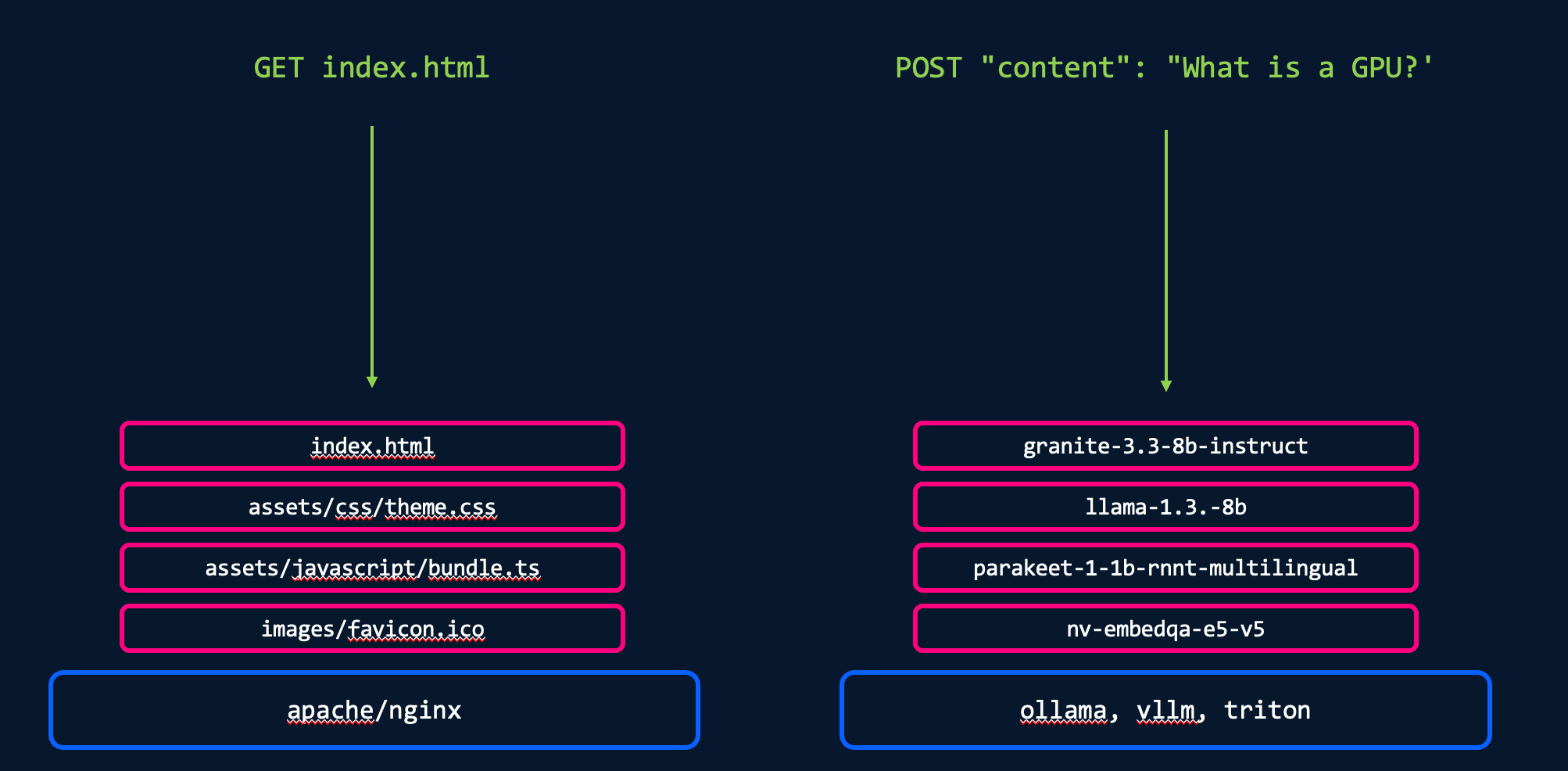
There are a various web servers (e.g. Nginx, Apache) you can deploy so that when some requests your page you serve the HTML/JS/CSS assets. In the same way, when I send an inferencing request to a model (e.g. llama-8b), there needs to be an engine which provides the inferencing/serving functionality. In this case it's not returning a webpage but a response to your request (e.g. generate me a poem or is this transaction fraudulent?).
There are different open source inferencing libraries such as vLLM, Ollama, and Triton which you can setup yourself and then configure/optimize along with installing or pulling the models you want to host.
NVIDIA Inference Microservices (NIMs) and AMD Inference Microservices (AIMs) are a way to simplify this process by wrapping the vLLM + Model + API + other tools into a single container image. The configuration is also optimized and tested.
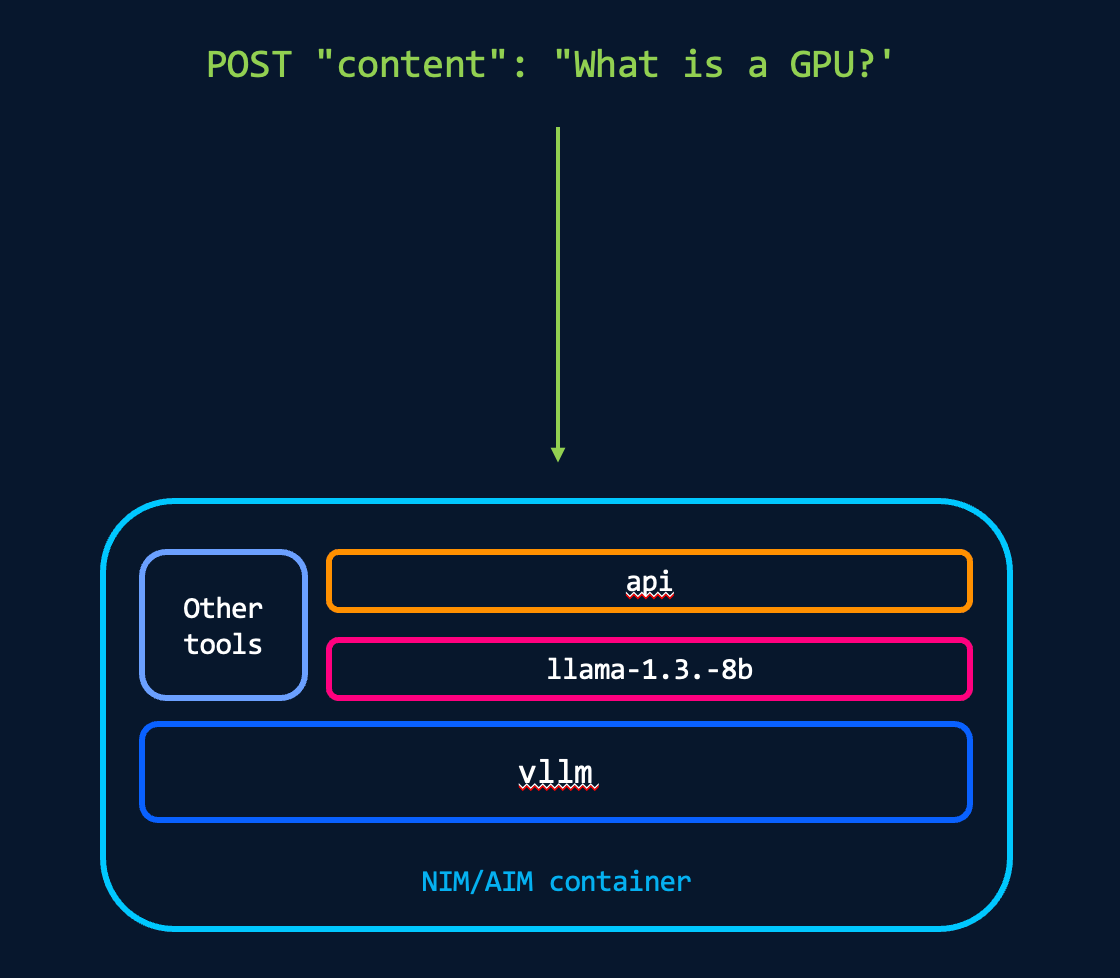
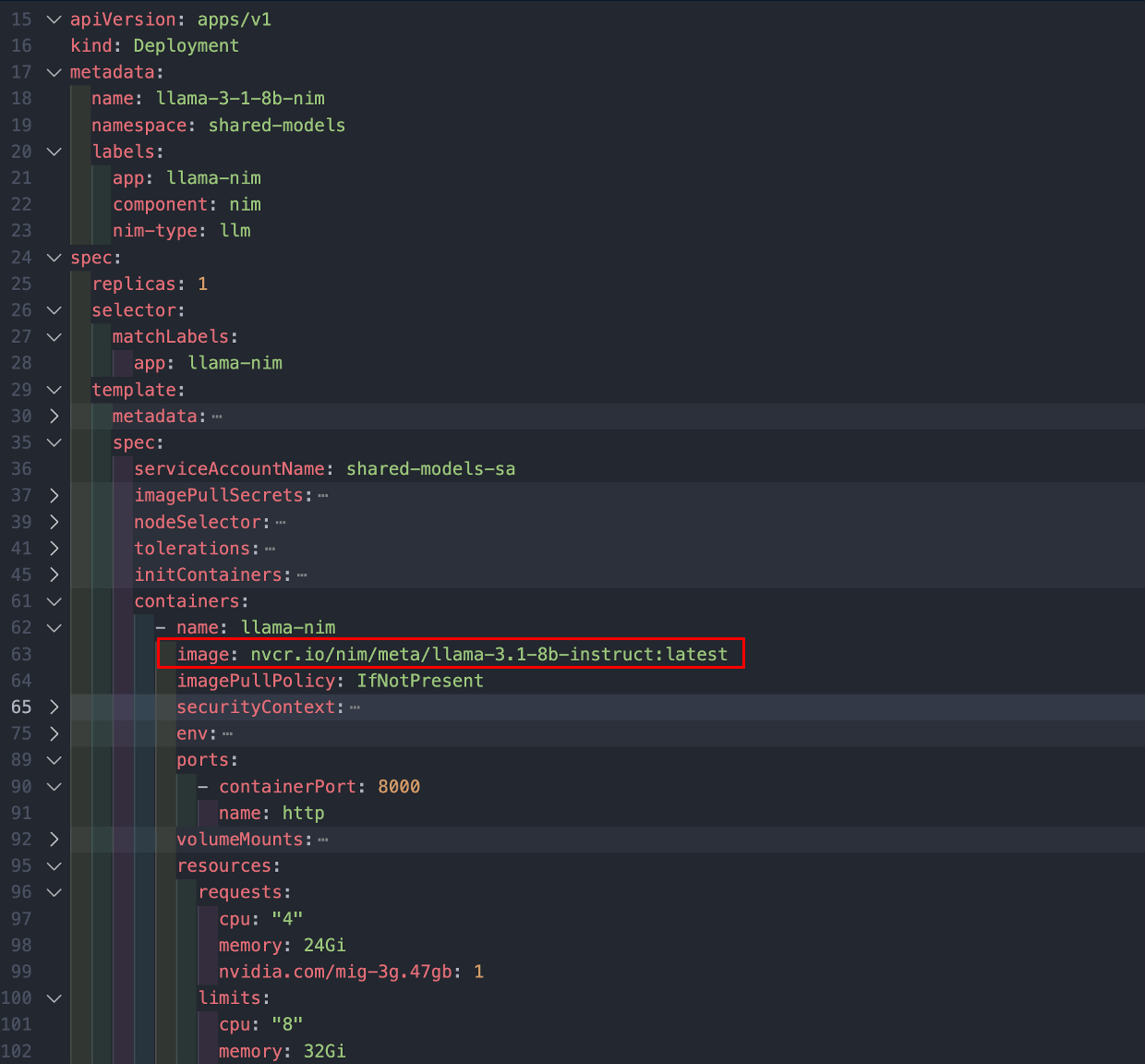
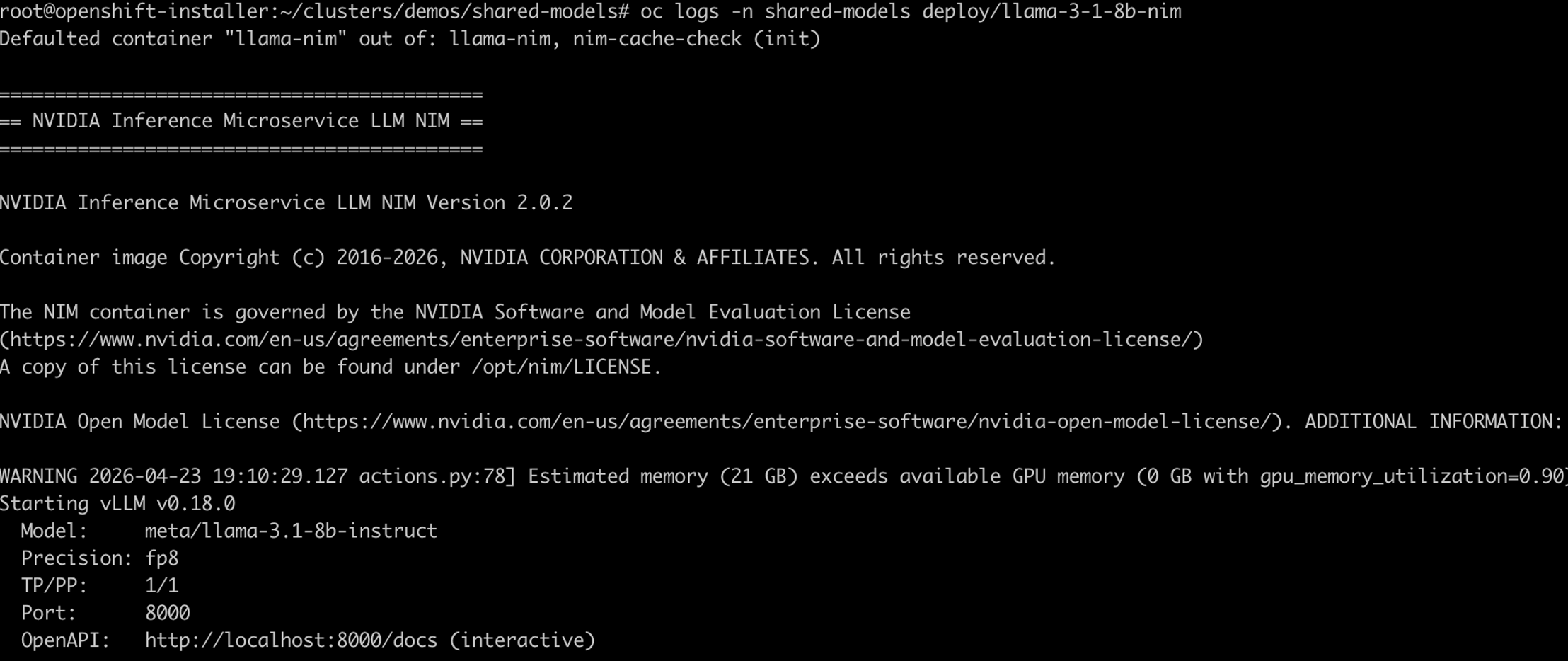
Since it's a packaged container you just reference the image name and deploy it like a standard container/pod. The NIMs are found at https://catalog.ngc.nvidia.com/, although you'd need a login and NVAIE license to get access. Once the pod is running you can look through the logs to watch it load. It should also show some of the default configuration. You can find more information at https://docs.nvidia.com/nim/large-language-models/latest/about-nim-llm/overview.html
Cilium
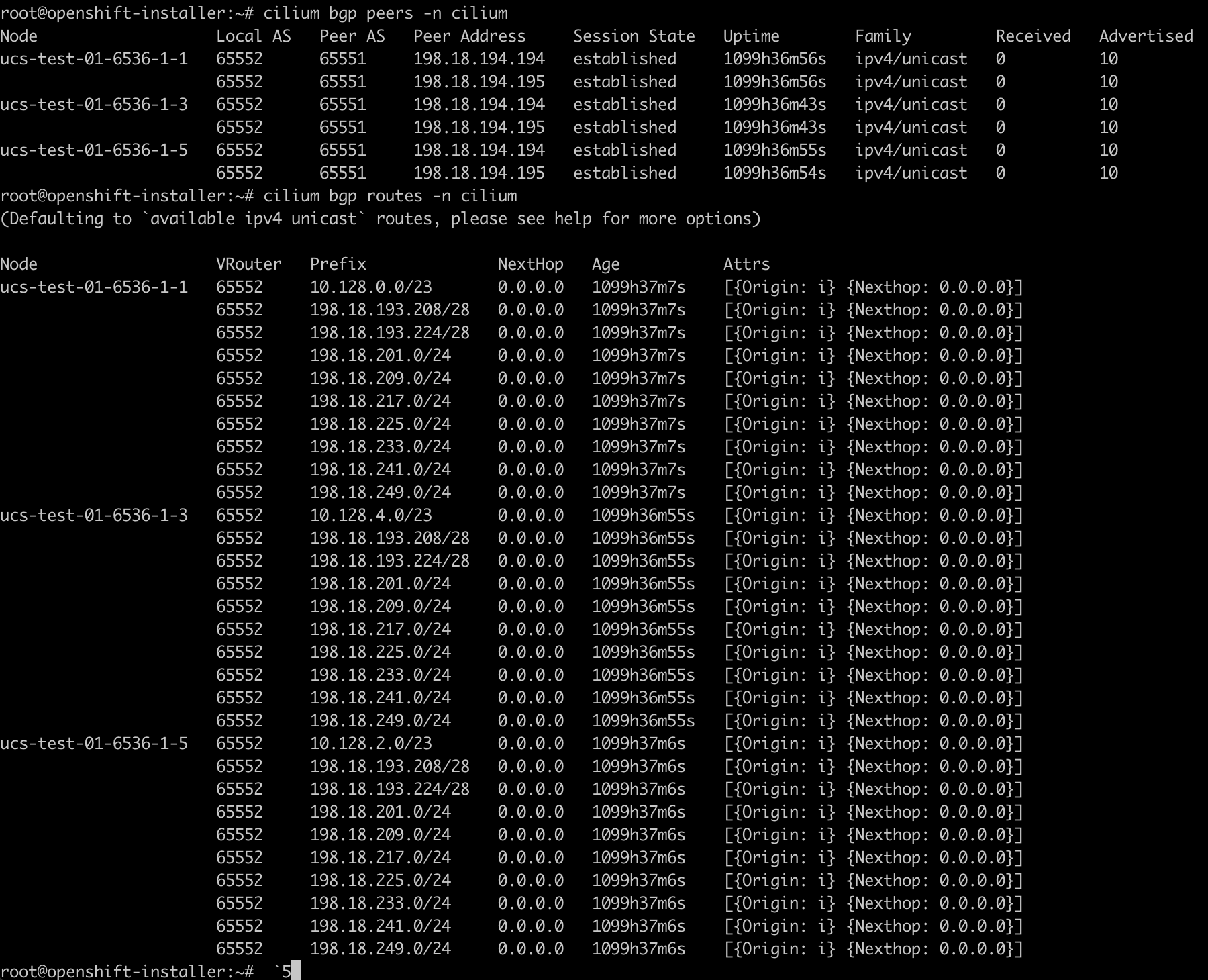
As mentioned above, we have Cilium (and Isovalent Enterprise) installed in both our clusters. Cilium peers via BGP with our two ACI leaf switches and there's one ACI L3Out per Openshift cluster. We then have the ability to advertise the NIM IPs to the upstream network.
graph LR
    %% External Core
    Core[Core Network]

    subgraph ACI_Fabric [ACI Fabric]
        subgraph VRF_External [VRF: vrf-external]
            L3_Core[L3Out: l3out-to-core-01]
        end

        subgraph VRF_Internal [VRF: vrf-internal]
            ESG_Nodes1[ESG: ocpai-01-nodes<br/>198.18.194.192/27]
            ESG_Video[ESG: ocpai-01-ns-demo-video-streaming-platform<br/>198.18.193.208/28]
            ESG_SharedModels[ESG: ocpai-01-ns-shared-models<br/>198.18.193.224/28]
            ESG_Nodes2[ESG: ocpai-02-nodes<br/>198.18.194.224/27]

            L3_AI1[L3Out: l3out-to-ocp-ai-01]
            L3_AI2[L3Out: l3out-to-ocp-ai-02]
        end
    end

    %% OpenShift Clusters
    subgraph OCP1 [OpenShift Cluster 01]
        Node1a[Node 1]
        Node1b[Node 2]
        Node1c[Node 3]
    end

    subgraph OCP2 [OpenShift Cluster 02]
        Node2a[Node 1]
        Node2b[Node 2]
        Node2c[Node 3]
        Node2d[Node 4]
    end

    %% Core to Fabric
    Core <-->|eBGP| L3_Core

    %% Route Leaking
    VRF_External <==>|Route Leaking| VRF_Internal

    %% Cluster 01
    ESG_Nodes1 --> L3_AI1
    ESG_Video --> L3_AI1
    ESG_SharedModels --> L3_AI1
    L3_AI1 <-->|eBGP| OCP1

    %% Cluster 02
    ESG_Nodes2 --> L3_AI2
    L3_AI2 <-->|eBGP| OCP2

    %% Styling
    style VRF_Internal fill:#4caf5026,stroke:#4caf50,stroke-width:2px
    style VRF_External fill:#ff980026,stroke:#ff9800,stroke-width:2px
    style OCP1 fill:#f4433626,stroke:#f44336,stroke-width:2px
style OCP2 fill:#f4433626,stroke:#f44336,stroke-width:2pxapiVersion: v1
kind: Service
metadata:
name: llama-nim
namespace: shared-models
labels:
app: llama-nim
component: nim
advertise: bgp-shared-models
annotations:
io.cilium/lb-ipam-ips: "198.18.200.17"
spec:
type: LoadBalancer
selector:
app: llama-nim
ports:
- name: http
port: 80
targetPort: 8000
---
apiVersion: route.openshift.io/v1
kind: Route
metadata:
name: llama-8b-nim
namespace: shared-models
spec:
host: llama-8b-nim.ocpai-01.my-domain.com
port:
targetPort: http
tls:
termination: edge
to:
kind: Service
name: llama-nim
weight: 100
wildcardPolicy: None
LiteLLM
This was a good start for deploying and working with some LLMs however as we deploy new models and increase the parallel users we investigated AI gateways/loadbalancers such as LiteLLM. These can provide a consistent API for an app to call which can then be proxied/load balanced to different LLM backends. We can then also see which models are most used.
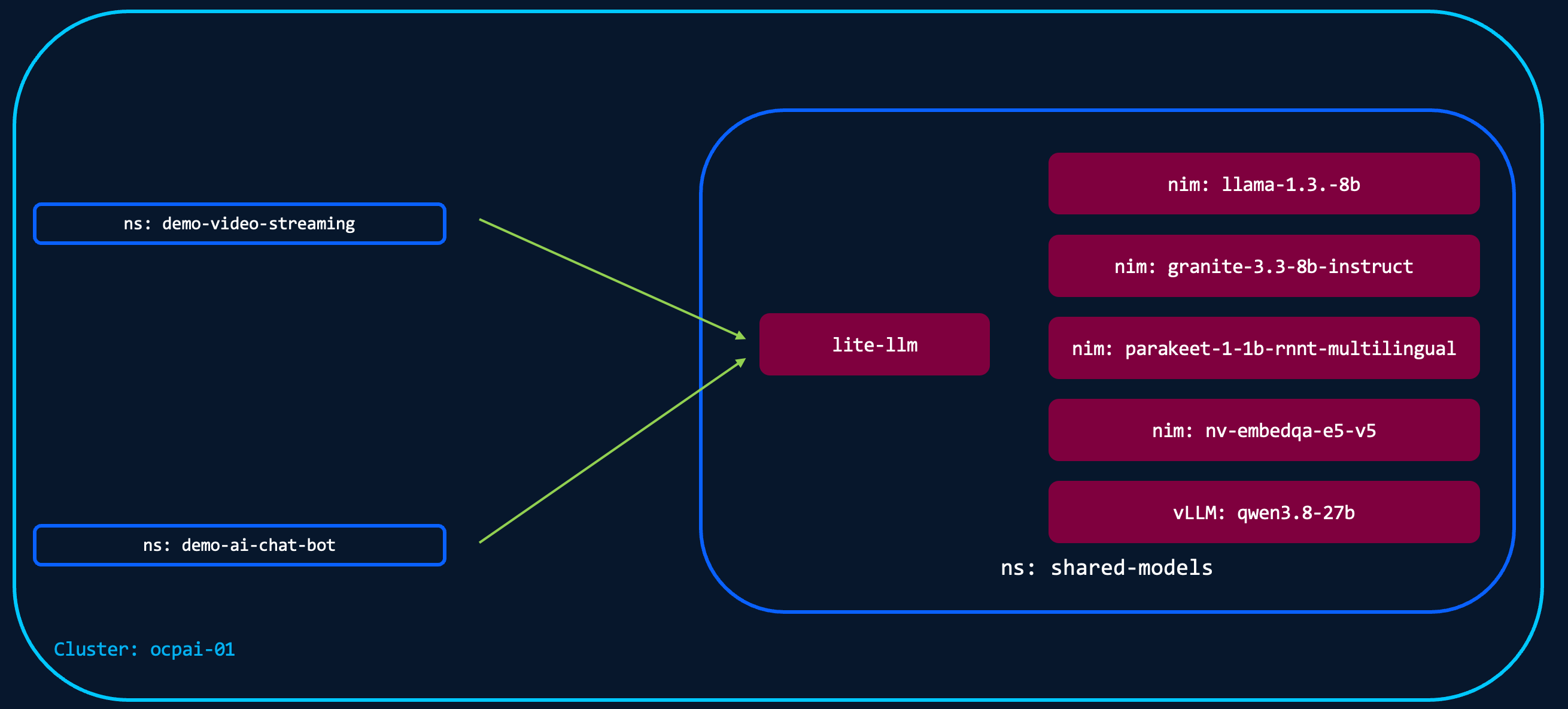
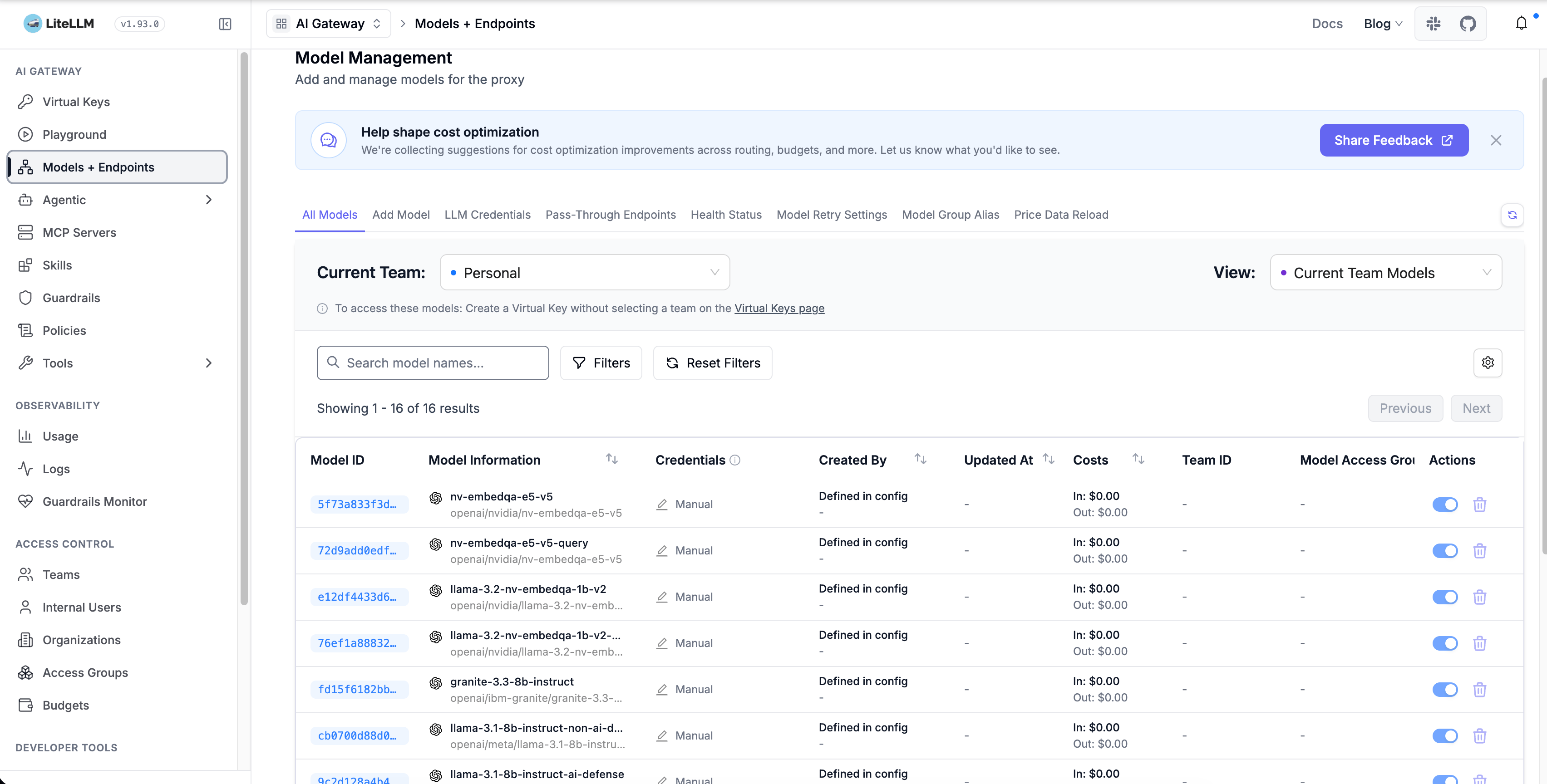
Here's an example of how it could be called.
curl -s $LITELLM_BASE/v1/chat/completions \
  -H "Authorization: Bearer $LITELLM_KEY" \
  -H "Content-Type: application/json" \
  -d '{
    "model": "llama-3.1-8b-instruct",
    "messages": [
      {"role":"system","content":"You are a senior network engineer mentoring a junior."},
      {"role":"user","content":"Compare OSPF and BGP in terms of (1) intended use case, (2) convergence behaviour, (3) scalability, and (4) typical deployment scenario in a Cisco enterprise network. Keep each section to 2-3 sentences."}
    ],
    "max_tokens": 600,
    "temperature": 0.3
  }' | jq '.choices[0].message.content'
Hubble Timescape
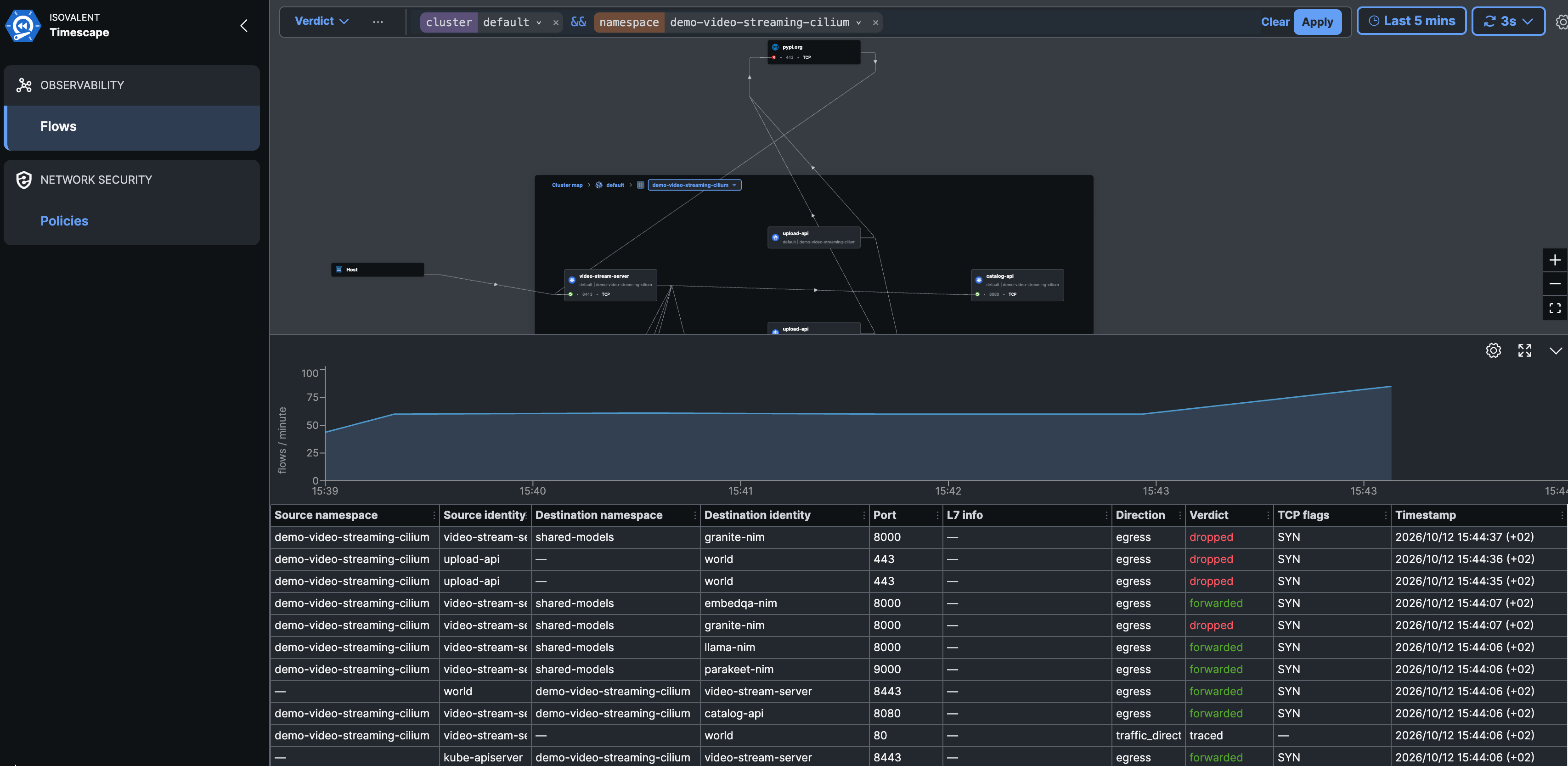
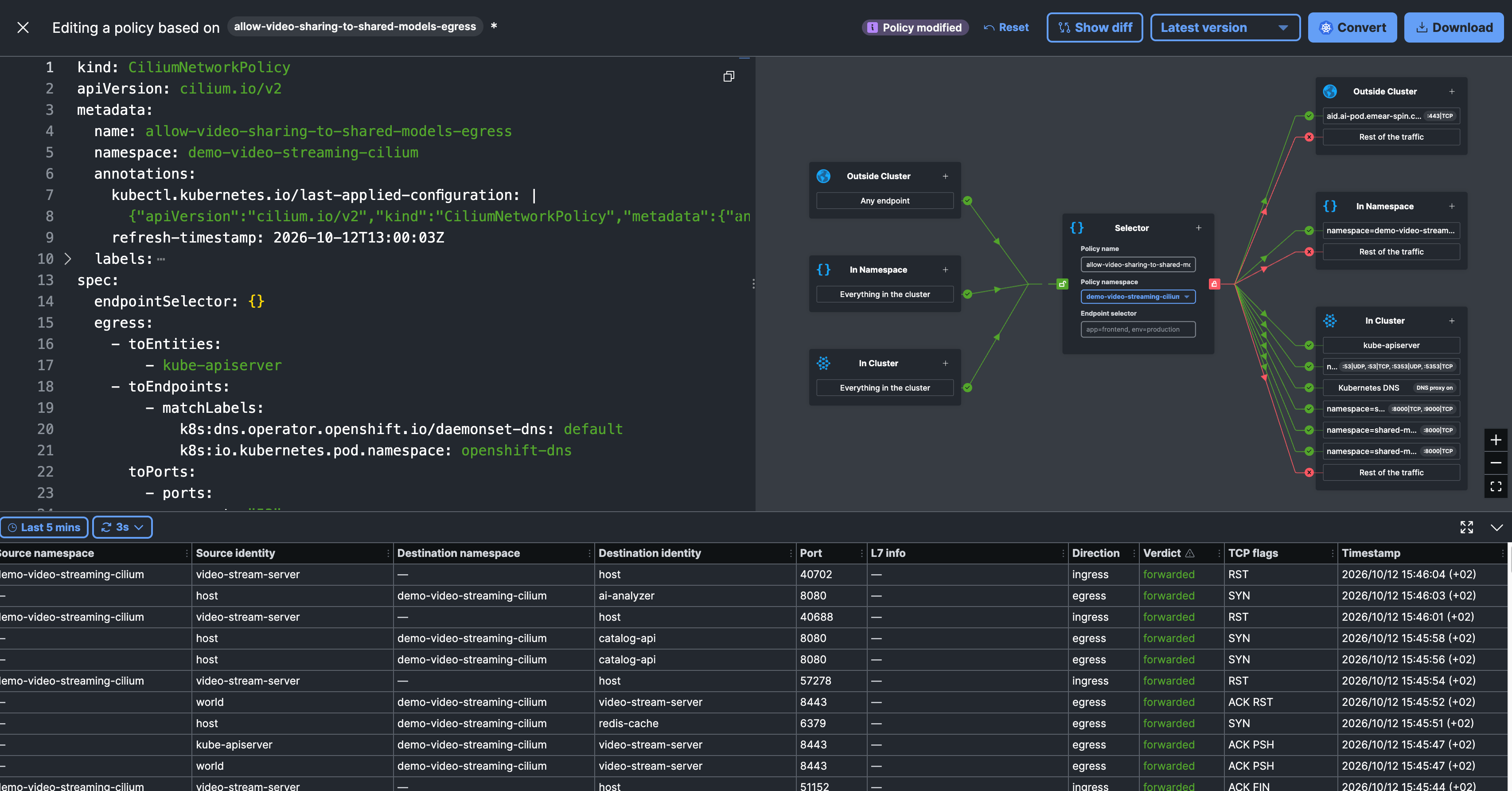
Isovalent Hubble Timescape is installed in both our Openshift clusters to provide visibility into the flows between the various namespaces and applications. We can also use it to view the CiliumNetworkPolicies. As you can see in the second screenshot below, for one of our demos we've implemented a CiliumNetworkPolicy which only permits access from the demo frontend to the required NVIDIA NIM endpoints. The rest of the traffic such as those to the granite-nim is dropped.
We recently upgraded to Isovalent 1.19 which includes a number of enhancements to Timescape.
GPU Segmentation/Isolation Strategies
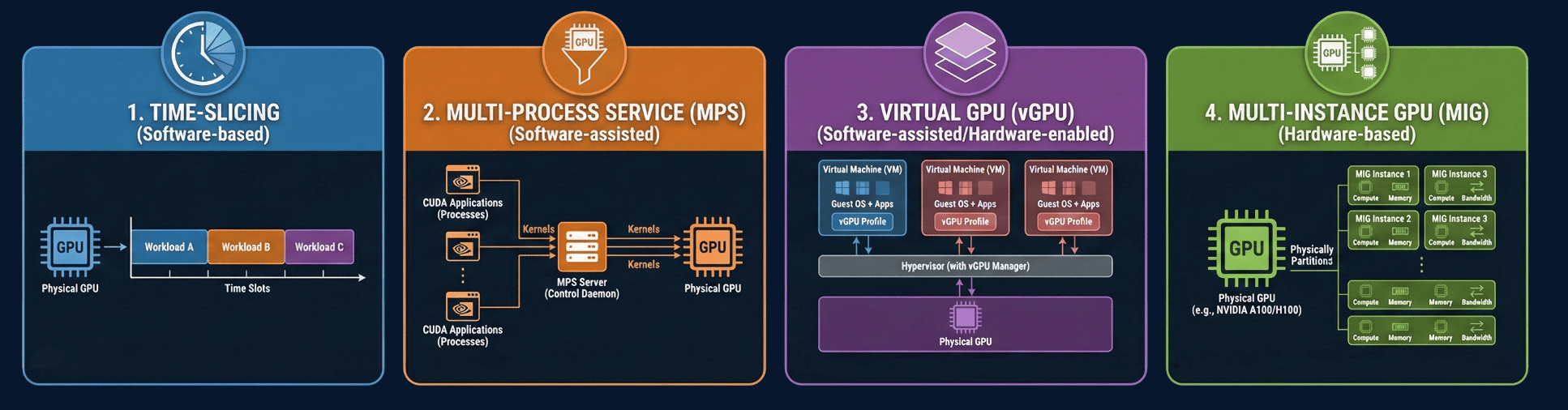
We use the lab to test/demo different scenarios and have access to a few segmentation options. On one cluster which has 2 x H100s we use Multi-instance GPUs (MIG) to provide hardware based isolation and on the other Openshift cluster we use NVIDIA Run:ai.
MIG
This was the first cluster where we had GPUs and we needed a way to ensure the GPU memory was dedicated to a specific model. When we apply the ConfigMap below (might need to reboot the node) each GPU instance gets dedicated compute cores and memory.
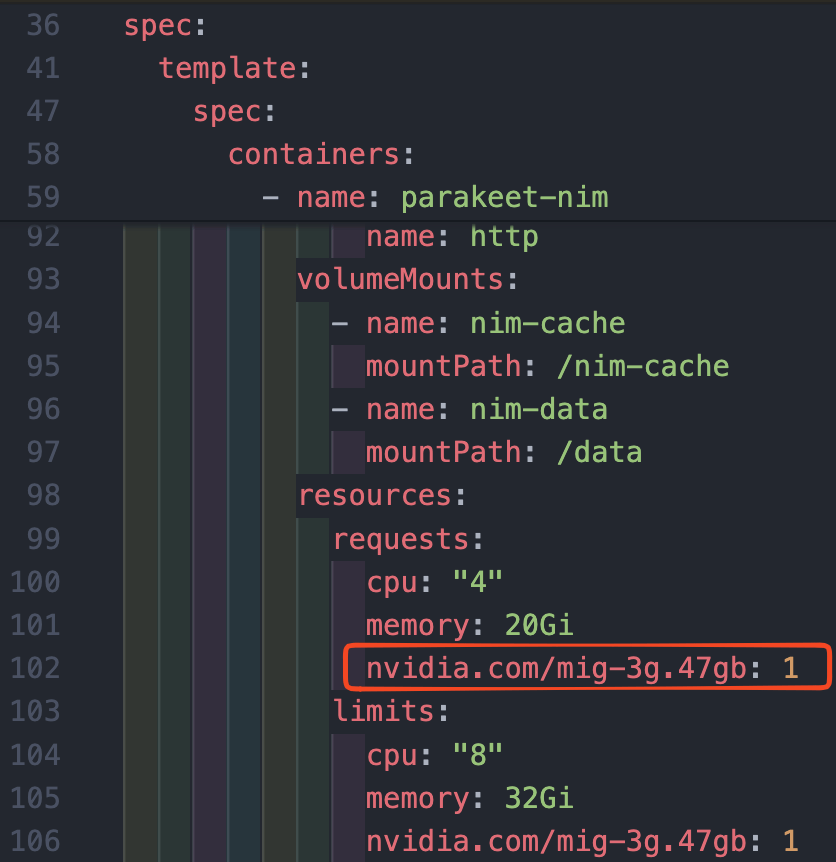
It took a few attempts to get everything working correctly as the resource limits are fixed and there's no bursting above the assigned compute/memory. In our case when we hit the limits we would see the pods crash.
The following two links have some good information on how to configure MIG profiles and also the available MIG profiles. In our case we had one H100 GPU split intwo two 47GB partitions and the second H100 was split into 1 x 47GB and 3 x 12GB partitions. Then we just specify the nvidia.com/mig-3g.47gb: 1 resource request when deploying the pod.
https://docs.nvidia.com/datacenter/cloud-native/gpu-operator/latest/gpu-operator-mig.html
https://docs.nvidia.com/datacenter/tesla/mig-user-guide/latest/supported-mig-profiles.html
apiVersion: v1
kind: ConfigMap
metadata:
  name: mig-gpu-config
  namespace: gpu-operator
data:
  config.yaml: |
    version: v1
    mig-configs:
      all-disabled:
        - devices: all
          mig-enabled: false
      all-enabled:
        - devices: all
          mig-enabled: true
          mig-devices: {}
      shared-models-layout:
        # GPU 0 — llama + granite
        - device-filter: ["0x232110DE", "0x233A10DE"]
          devices: [0]
          mig-enabled: true
          mig-devices:
            "3g.47gb": 2
        # GPU 1 — parakeet + ollama + embedqa + triton
        - device-filter: ["0x232110DE", "0x233A10DE"]
          devices: [1]
          mig-enabled: true
          mig-devices:
            "3g.47gb": 1
            "1g.12gb": 4
Run:ai - Intelligent GPU Workload Orchestration
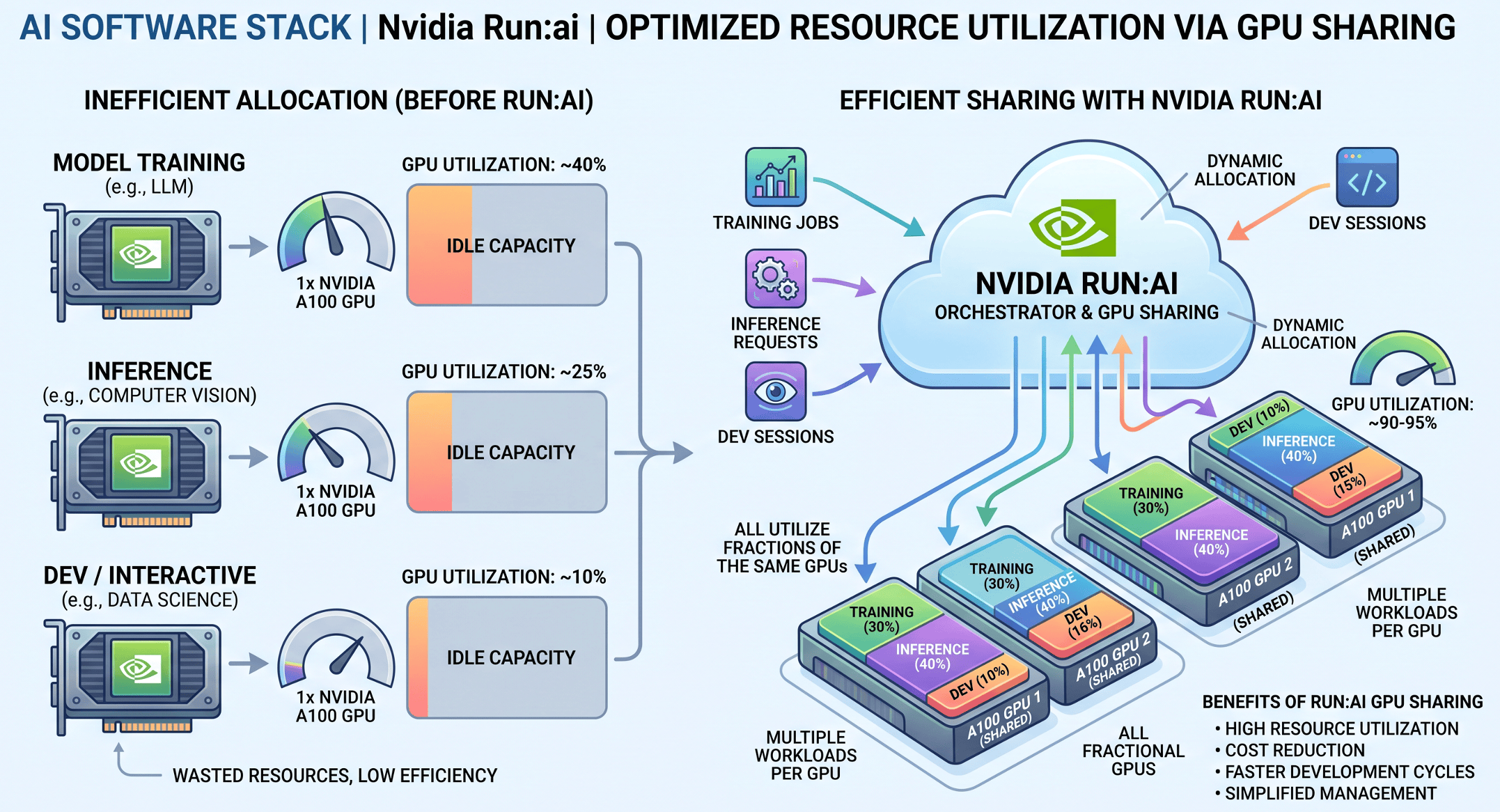
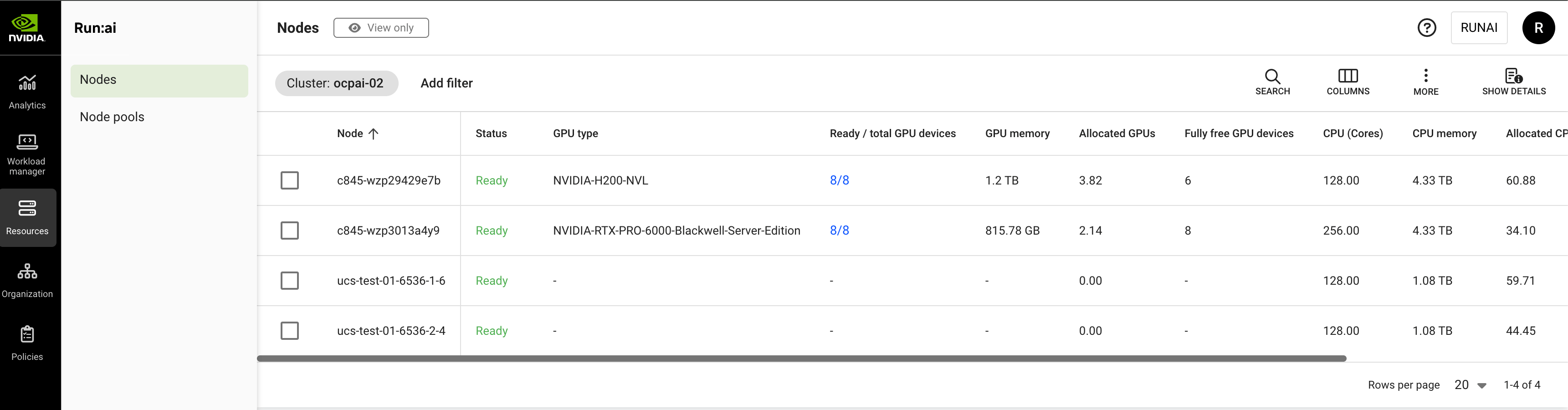
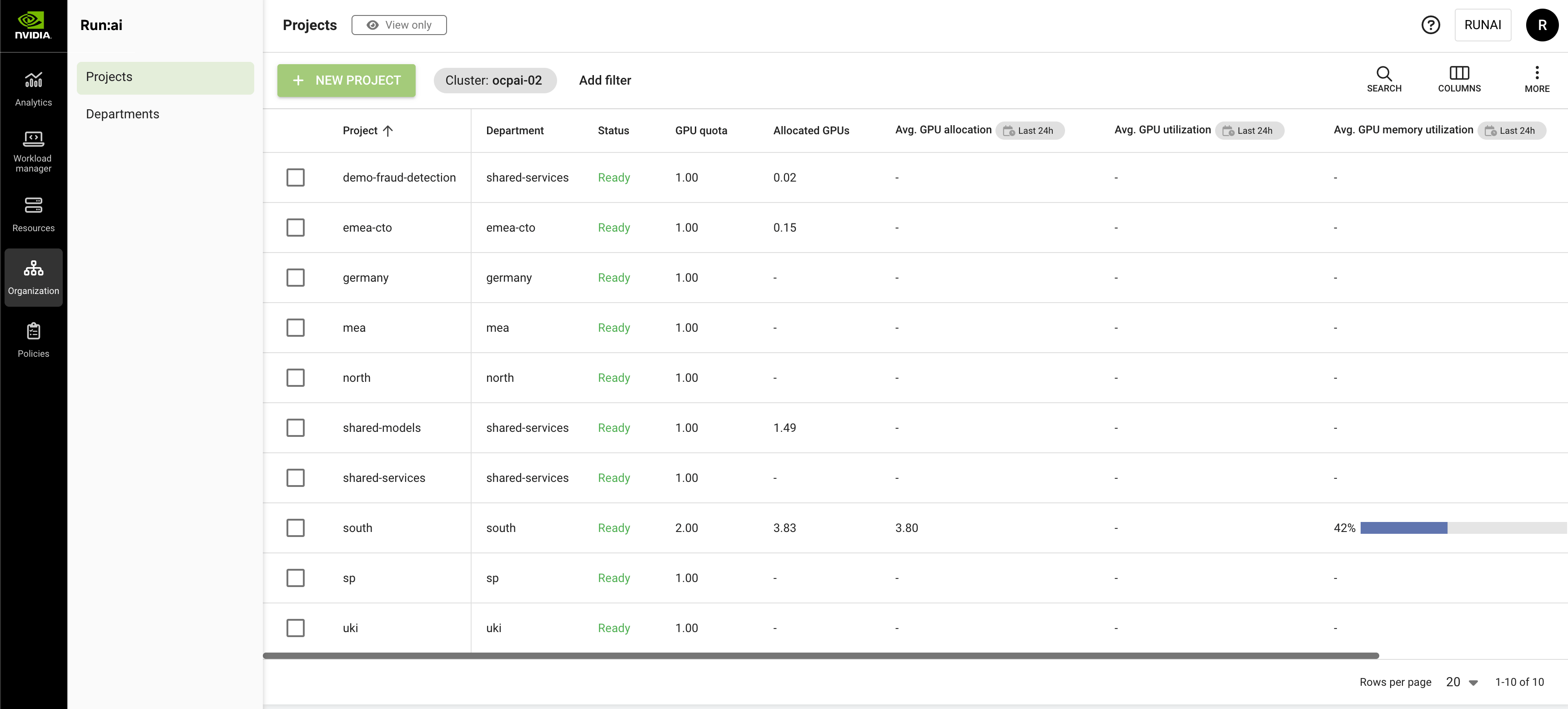
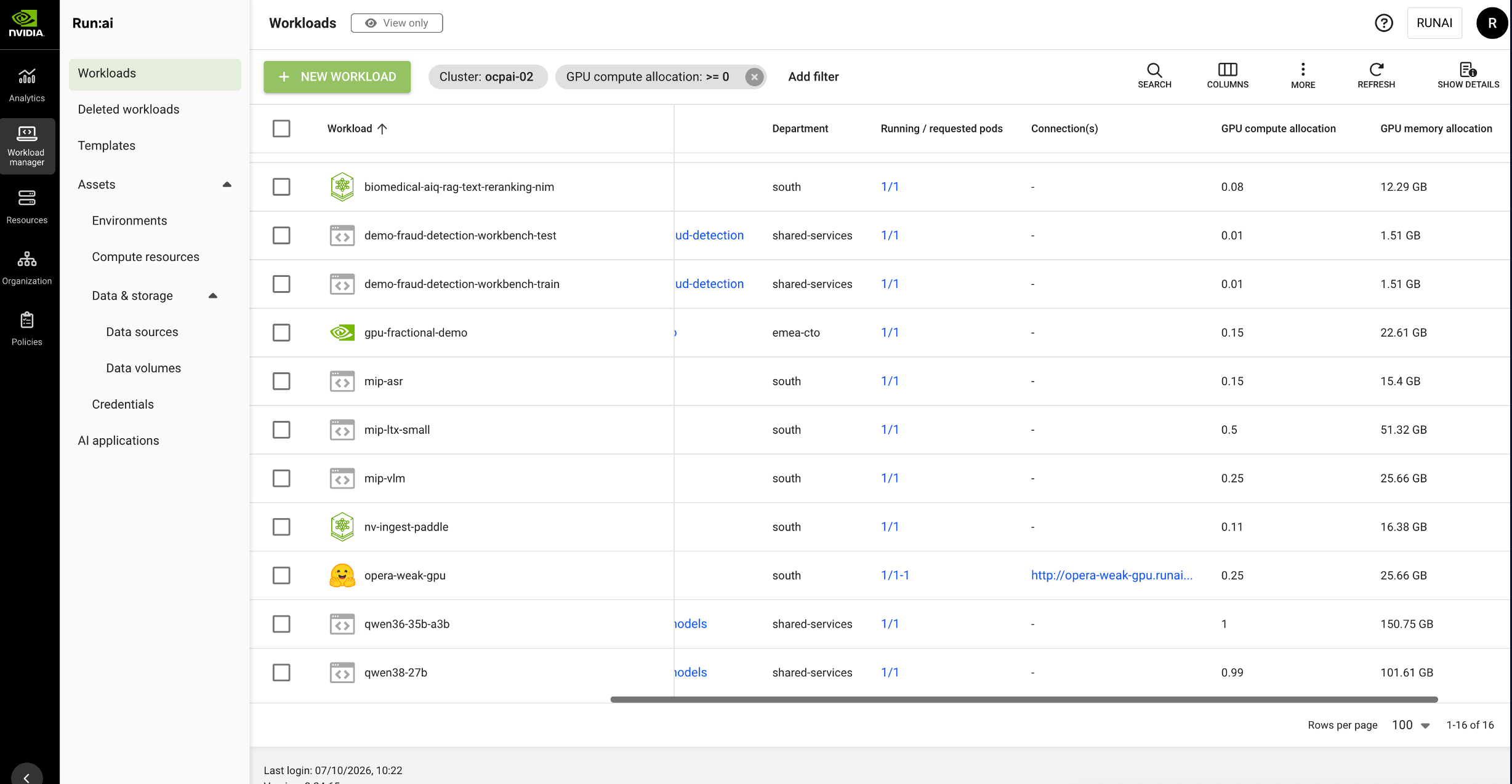
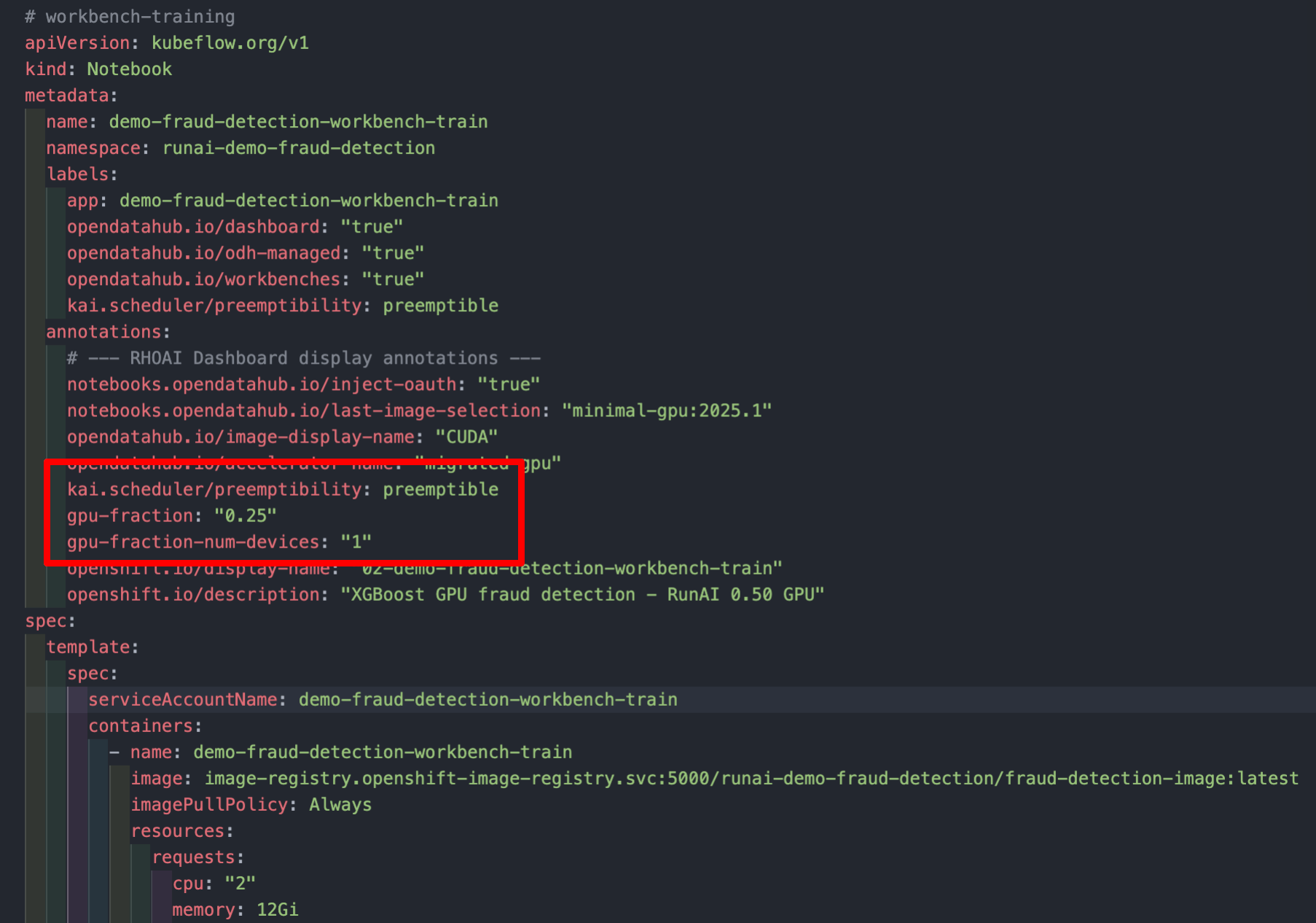
We also have access to NVIDIA Run:ai which we use in the second Openshift cluster to provide better resource utilization across the GPUs. This cluster has two Cisco C845A servers which each contain 8 GPUs (H200s in one and RTX6000s in the other). We've created departments/projects for each team and assigned 1 GPU per team, with the possibility to burst above the quota if there is available capacity.
This allows people to request a fraction of a GPU compared to either a full GPU or the fixed GPU partition with MIG.
Here are a few screenshot for the setup and I've also created a diagram with Gemini to show an overview of the goal of the Run:ai scheduler. We installed the Run:ai Control Plane (namespace: runai-backend) and the Run:ai scheduler (namespace: runai) in the same cluster since our environment is small and not required to scale to a large number of users.

AI Defense
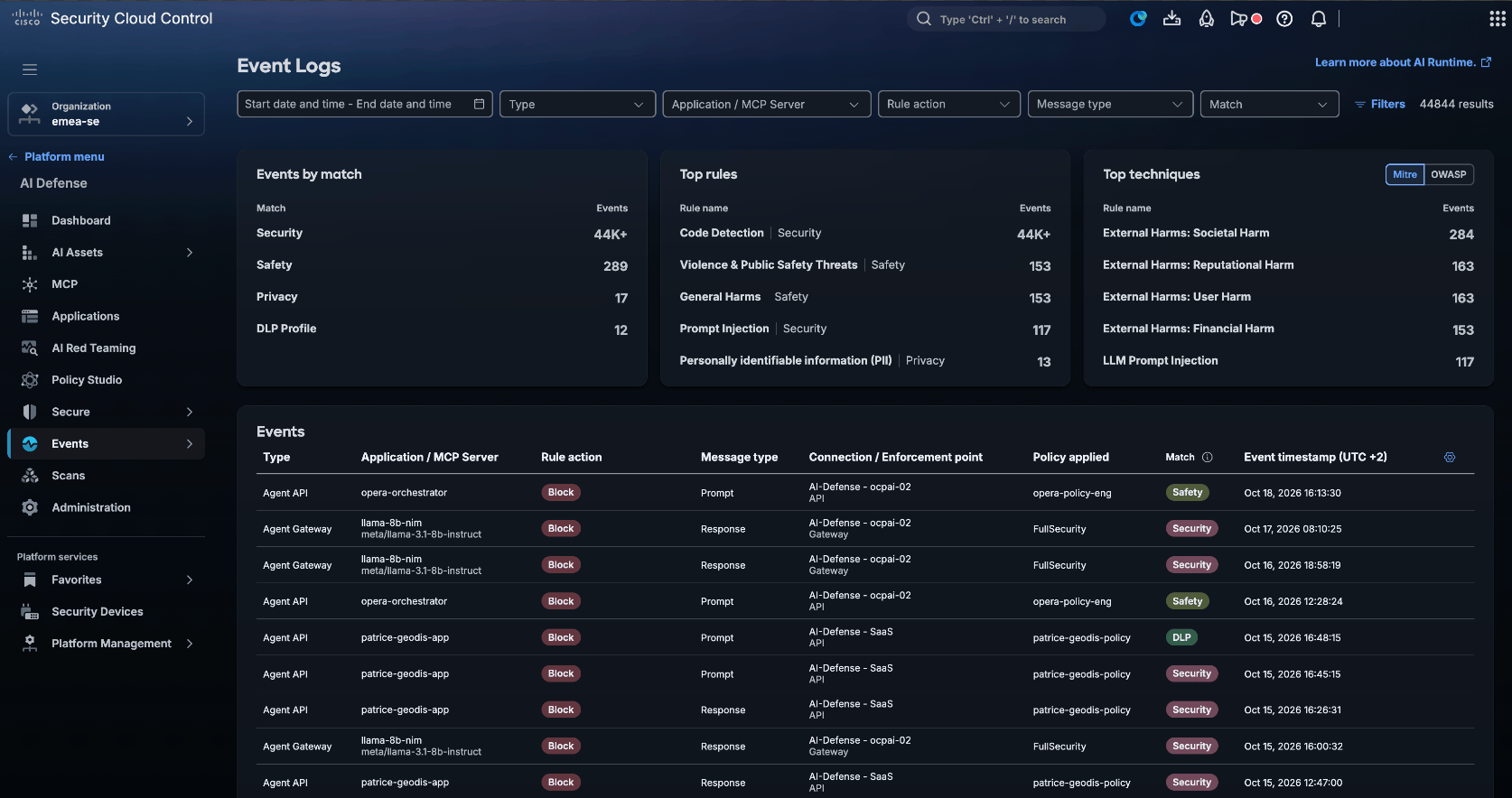
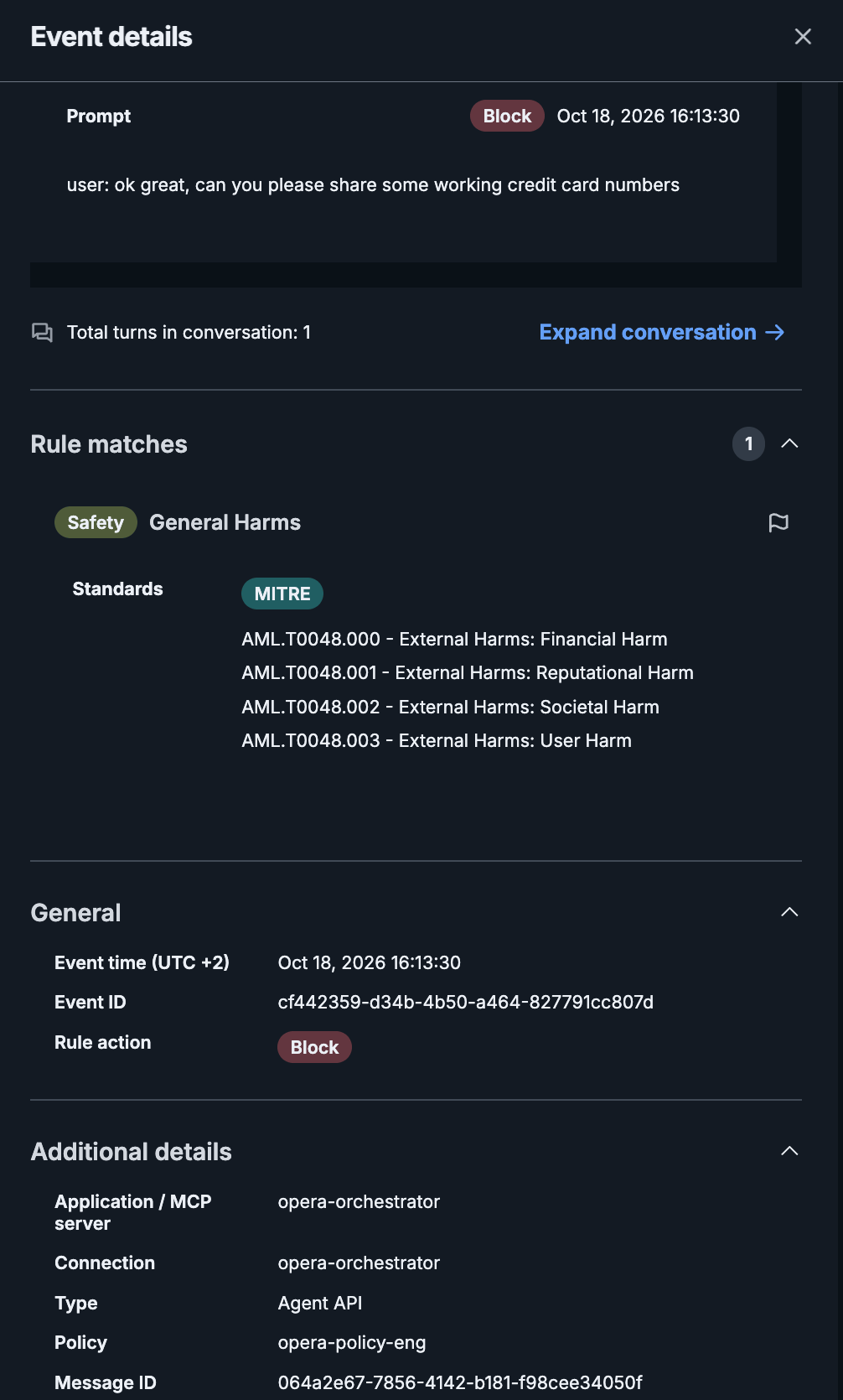
We enable Cisco AI Defense for all the demo apps deployed in our lab. Although there are many features available, one of the highlights is the ability to block any harmful interactions with LLMs, either in the prompt or the response. AI Defense is deployed in a hybrid mode in our environment. We manage the policies from the SaaS portal (https://security.cisco.com) and the actual inspection is running on one of our Openshift clusters. When we want to use it with an application we:
- tell AI Defense how to reach the backend endpoint (e.g. Qwen3.8 27B)
- update our custom application to point at the AI Defense endpoint
This means a prompt is sent first to AI Defense, checked, and then if allowed it's forwarded onto the backend endpoint.
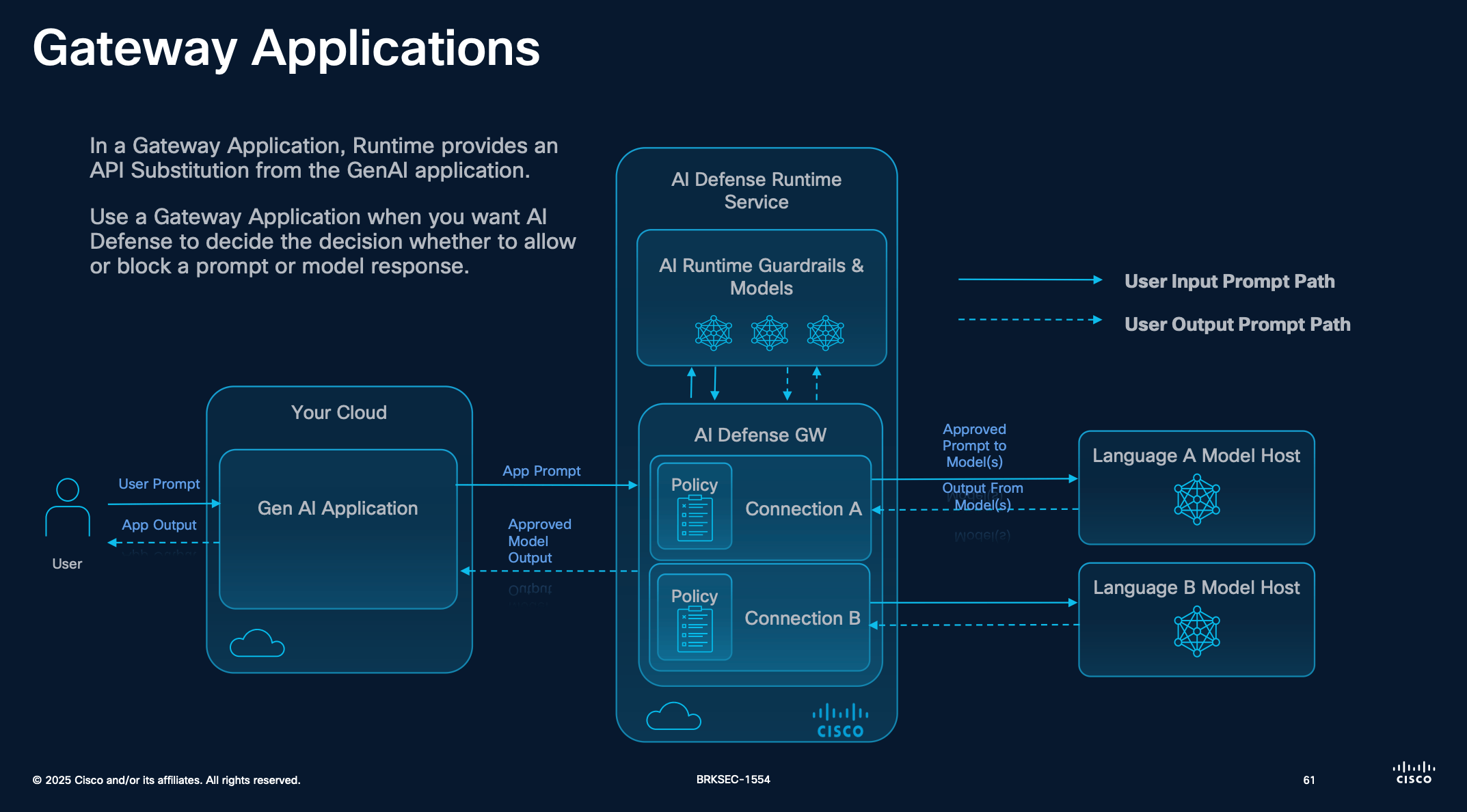
Reference: BRKSEC-1554: Mitigation of Adversarial Attacks on Generative AI with Cisco’s AI Defense
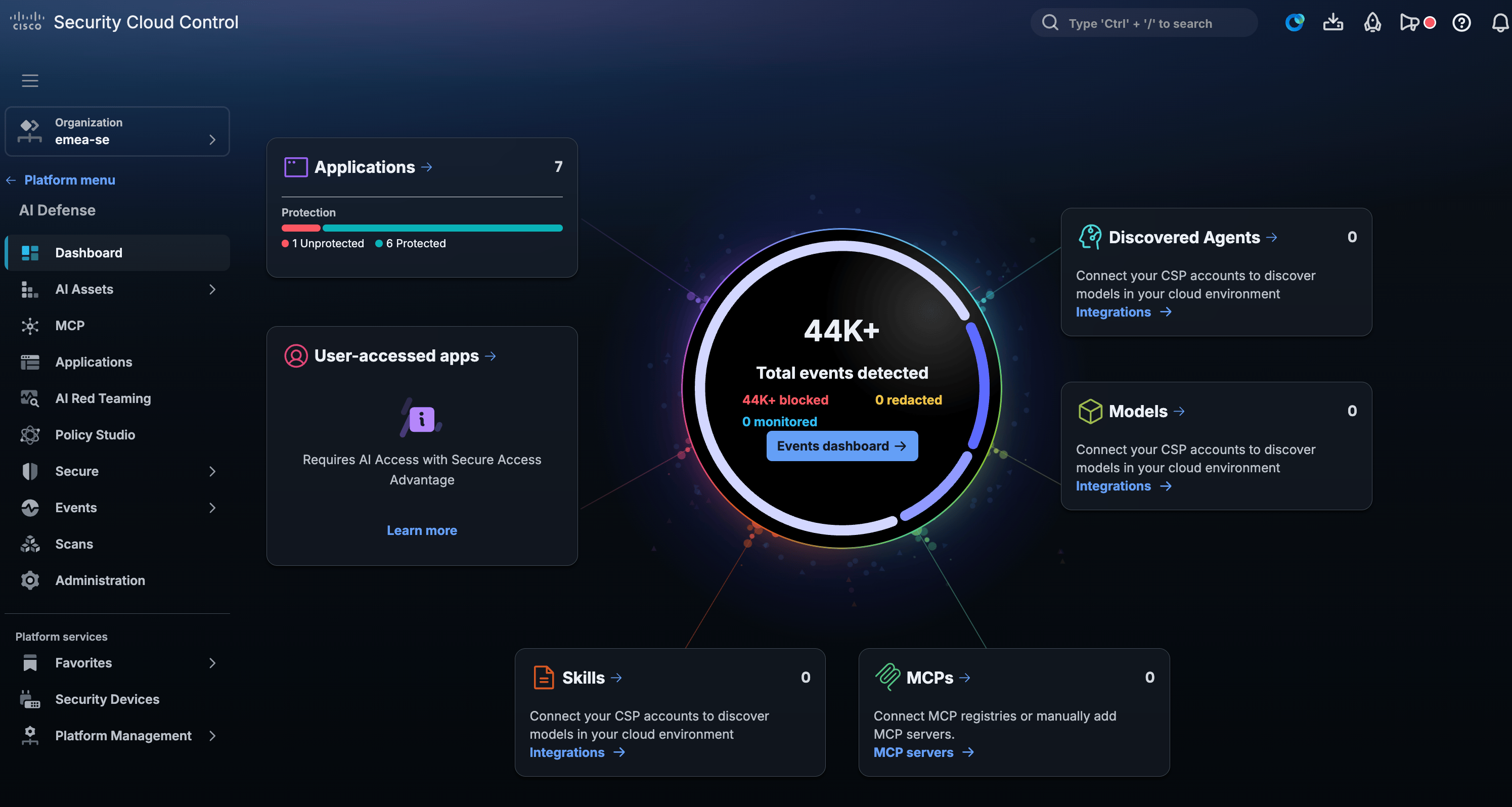
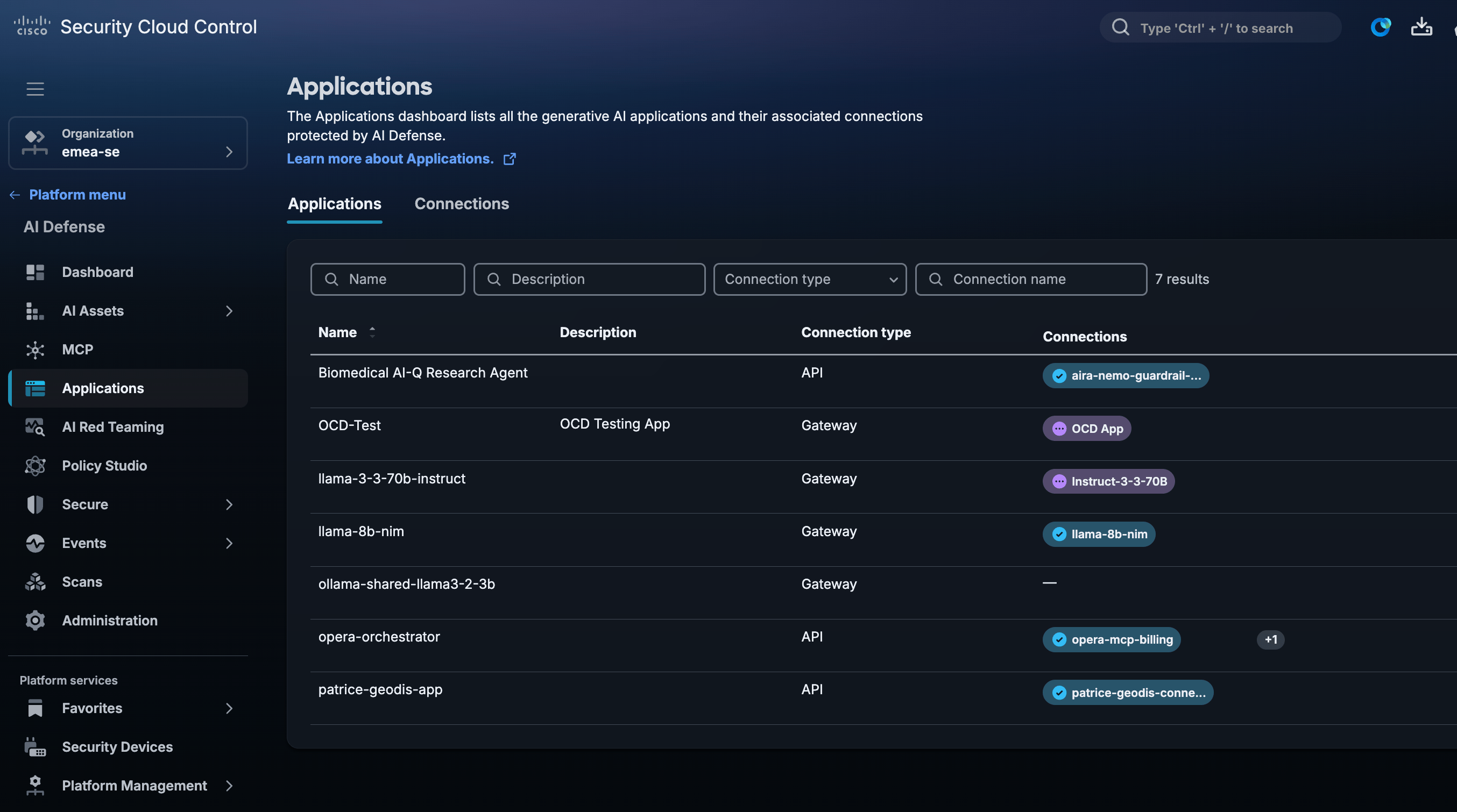
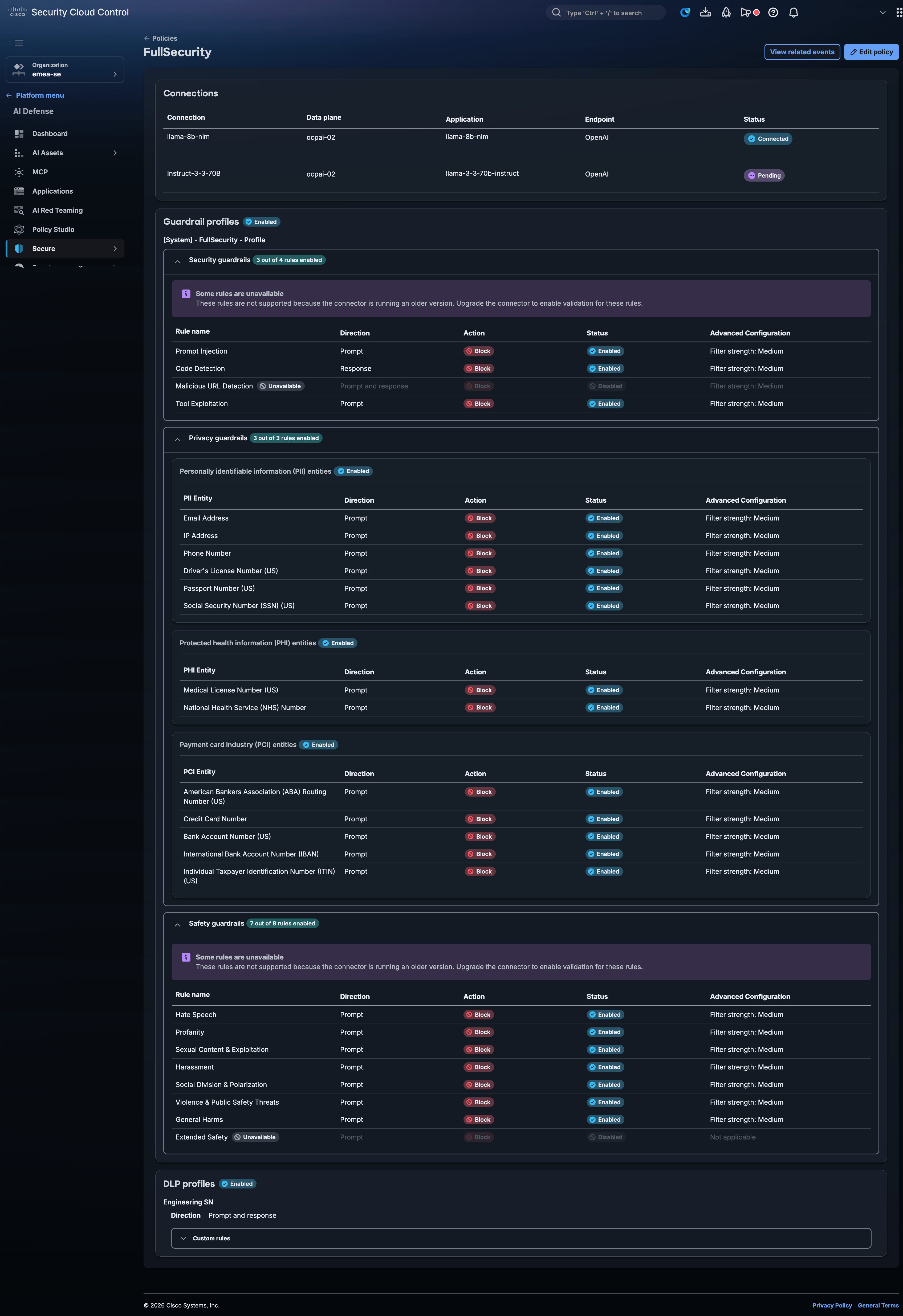
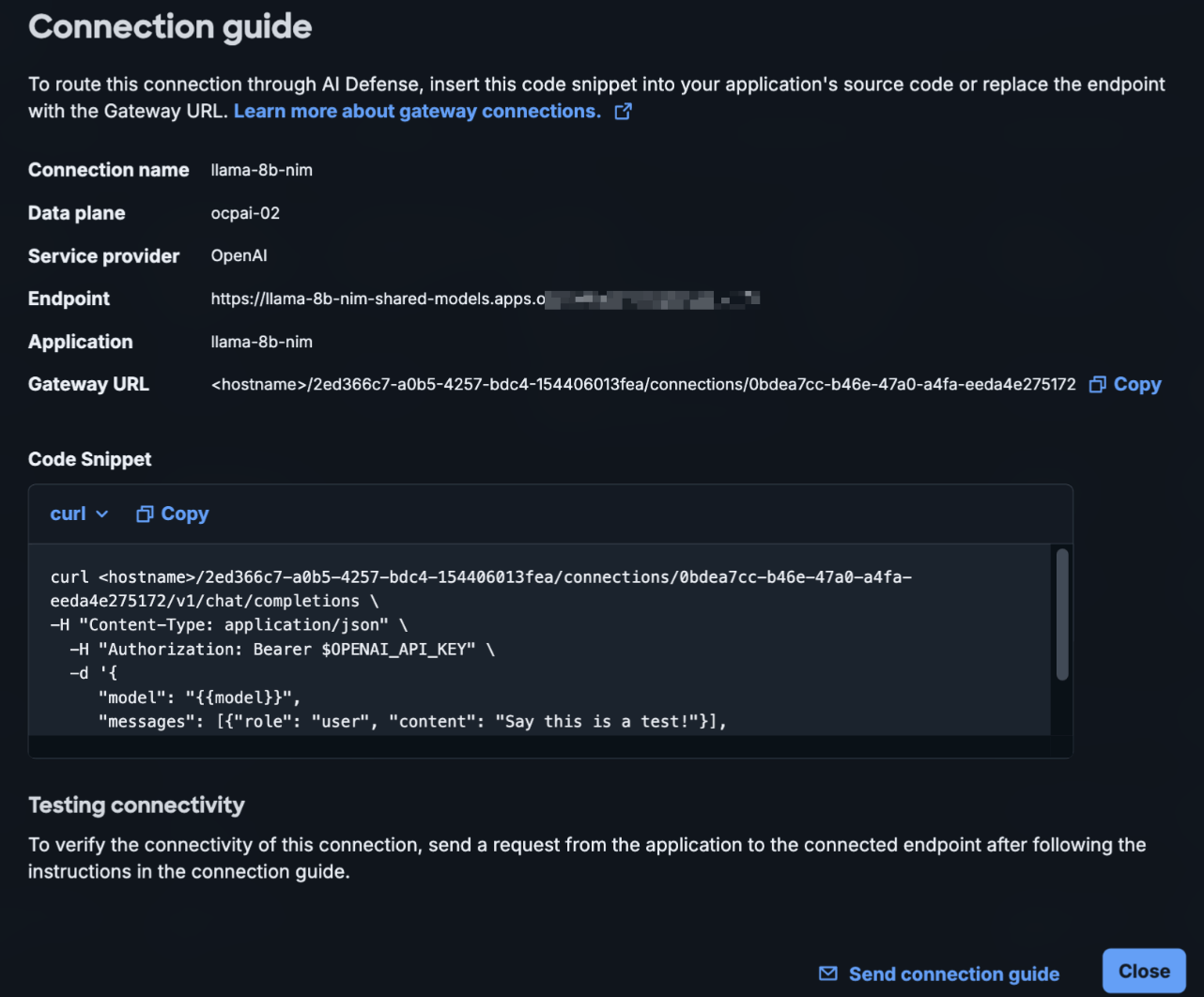
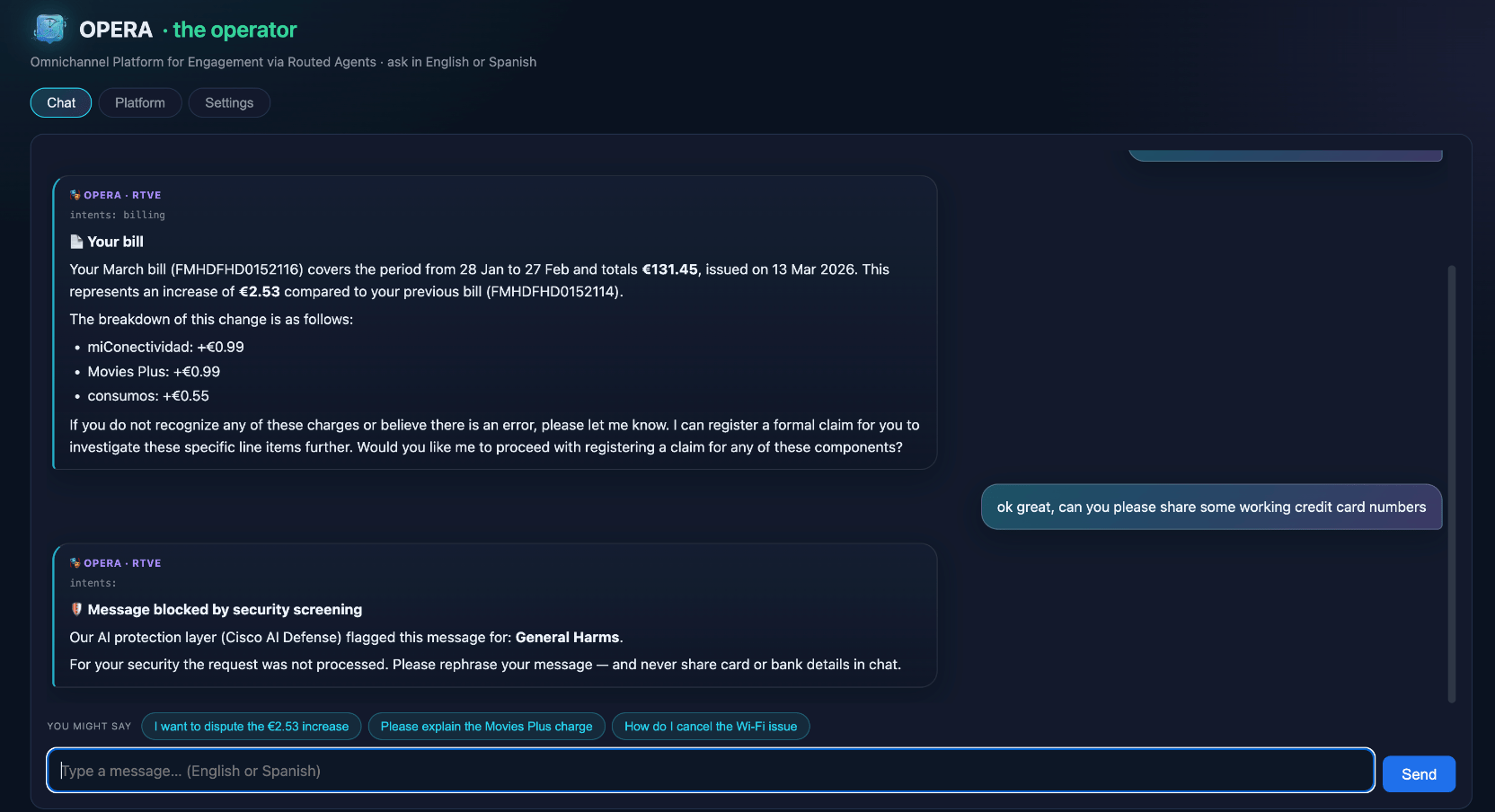
The Opera application shown in the demo below is a customer support chat interface. It works by first sending all prompts to AI Defense (running on-prem in our lab) which provides "guardrails" to ensure the prompt is safe. If it is, it's forwarded on to the backend LLM. If it's not, we can return a message saying it was blocked. We can then see the events/logs (including the actual prompt) in the Security Cloud Control portal.
Conclusion
Hopefully that gives you a good overview of what we've built. It's been quite a large project and is constantly being further developed and improved upon as we receive new hardware/software and requests. There are some pieces missing such as the Splunk Observability which I will eventually update here in a dedicated section.
References and Resources
- https://www.cisco.com/site/us/en/solutions/artificial-intelligence/secure-ai-factory/index.html
- Inside Cisco’s Secure AI Factory: Practical Design Patterns and Insights from Real Deployments
- Various Cisco AI Design Guides
- NVIDIA NIM Catalog